This guide is built for product managers, enterprise portfolio managers, Agile coaches, and transformation leaders who are trying to answer two practical questions:
- ●What are the best backlog prioritization tools?
- ●Which tool offers Kanban boards and backlog prioritization in one place, without forcing you to duct-tape spreadsheets, plugins, and workarounds?
In our experience, the best backlog prioritization tool is the one that makes priority visible inside the workflow.
Why Backlog Prioritization Breaks Down in Real Teams
Bottom line: most teams don't have a prioritization problem. They have a capacity and visibility problem.
Here's what we see repeatedly (and what practitioners describe bluntly):
Planned work competes with unplanned work
Teams carry work as usual, fixes, and "incidents" requests that appear mid-stream. When you don't explicitly allocate capacity for these, the backlog becomes a wish list and your throughput becomes unpredictable.
Priority becomes a negotiation
If the system can't show priority clearly, people push it socially: escalation, urgency. That's how the backlog turns into politics.
Teams get pulled into business prioritization
Teams should influence sequence when it's inefficient or blocked by dependencies. But priority itself is a business decision. When a team is asked to "decide what matters," that's often a sign leadership hasn't made trade-offs explicit.
Backlogs grow faster than decisions.
If you're staring at 400+ incidents and trying to spend 30–60 seconds per item, you're not lazy. You're responding to the only constraint that matters: time. In those situations, you need a method that balances speed with protection of value.
We've seen this pattern repeatedly in organizations that try to manage complex portfolios solely with sprint-based planning. One Businessmap client described their situation:
"We had so many different products and ways of working that we completely lost the bird's-eye view of what was happening. From one sprint to the next, work kept rolling over because estimations were off. By the third sprint, we were still carrying work from four, five, even six sprints ago. What we called a process was really just a backlog of ideas, not an optimized flow."
— Product Director, Geneplanet, Businessmap customer
So when someone asks you, "Which backlog prioritization framework should we use?", your first question should be: Do you have a process to capture priorities and keep them visible once work starts? Because if you don't, the best framework in the world will die the moment the first urgent request lands.
Explore how Kanban-based management creates a real bird's-eye view
EXPLORE KANBAN PROJECT MANAGEMENTWhat Teams Actually Prioritize Against
In theory, we prioritize based on value. In practice, teams prioritize against a small set of forces that keep showing up, no matter the industry.
Customer Pain
Rank using frequency, severity, and recurrence to maintain user-struggle clarity.
Business Value
Map features to retention, sales friction, cost savings, or expanded adoption.
Competitive Pressure
Use WSJF and Cost of Delay to factor in urgency and catch up quickly.
Bugs & Debt
A lightweight Cost of Delay assessment delivers speed over perfection.
What Are the Most Effective Backlog Prioritization Frameworks?
Frameworks are tools. The mistake is treating one framework as universal. Here are the frameworks we see working best when applied to the right type of backlog.
Use RICE to rank feature ideas and initiatives
RICE is a solid starting point for new work because it forces explicit thinking:
- Reach: who will it affect?
- Impact: what changes?
- Confidence: how sure are we?
- Effort: what will it cost?
In practice, RICE is less about the number and more about the conversation: What do we actually know? What are we guessing?
Where it fits: product initiatives, feature discovery, roadmap candidates
Use MoSCoW to align stakeholders fast
MoSCoW is great when you need agreement, not precision: Must have, Should have, Could have, Won't have (for now). It's especially useful during planning because it forces trade-offs. If everything is a Must, nothing is prioritized.
Where it fits: stakeholder alignment, scope negotiation, planning conversations
Use WSJF when delay is expensive and capacity is tight
WSJF asks the question: What would cost us if we delayed option A vs. option B? You stop defaulting to "big initiatives first" and start pulling work that is most economically beneficial.
Where it fits: enterprise initiatives, cross-team work, portfolio sequencing, high-impact bugs
How Do You Combine Backlog Prioritization with Kanban Workflow Management?
This is the core: prioritization needs a place to live after the meeting ends. Kanban gives you that place if you set it up intentionally.
Use a refinement board before work enters delivery
One of the most pragmatic techniques we've used is a refinement board: a Kanban view of backlog states before work is committed.
The point is simple:
- keep discovery and refinement visible
- avoid creating artificial "open sprints"
- prevent half-baked items from flooding delivery
Instead of pushing work into execution, you pull it when it meets your definition of ready.
In Businessmap, this is natural to implement: you can run an upstream refinement workflow that feeds an execution board, without pretending every team needs a sprint construct to stay organized.
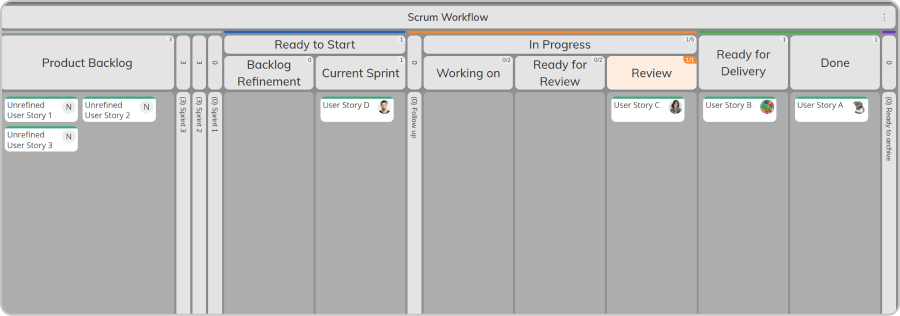 Mapping a scrum workflow with product backlog and refinement areas on a kanban board
Make priority explicit with ordering and swimlanes
A prioritized backlog isn't a list with "High" tags. It's a system that tells you, at a glance:
- what matters most
- what is urgent
- what is standard
- what is not worth working on yet
Swimlanes are a practical way to make that visible. When priority is built into the board design, it becomes difficult to ignore and easier to defend.
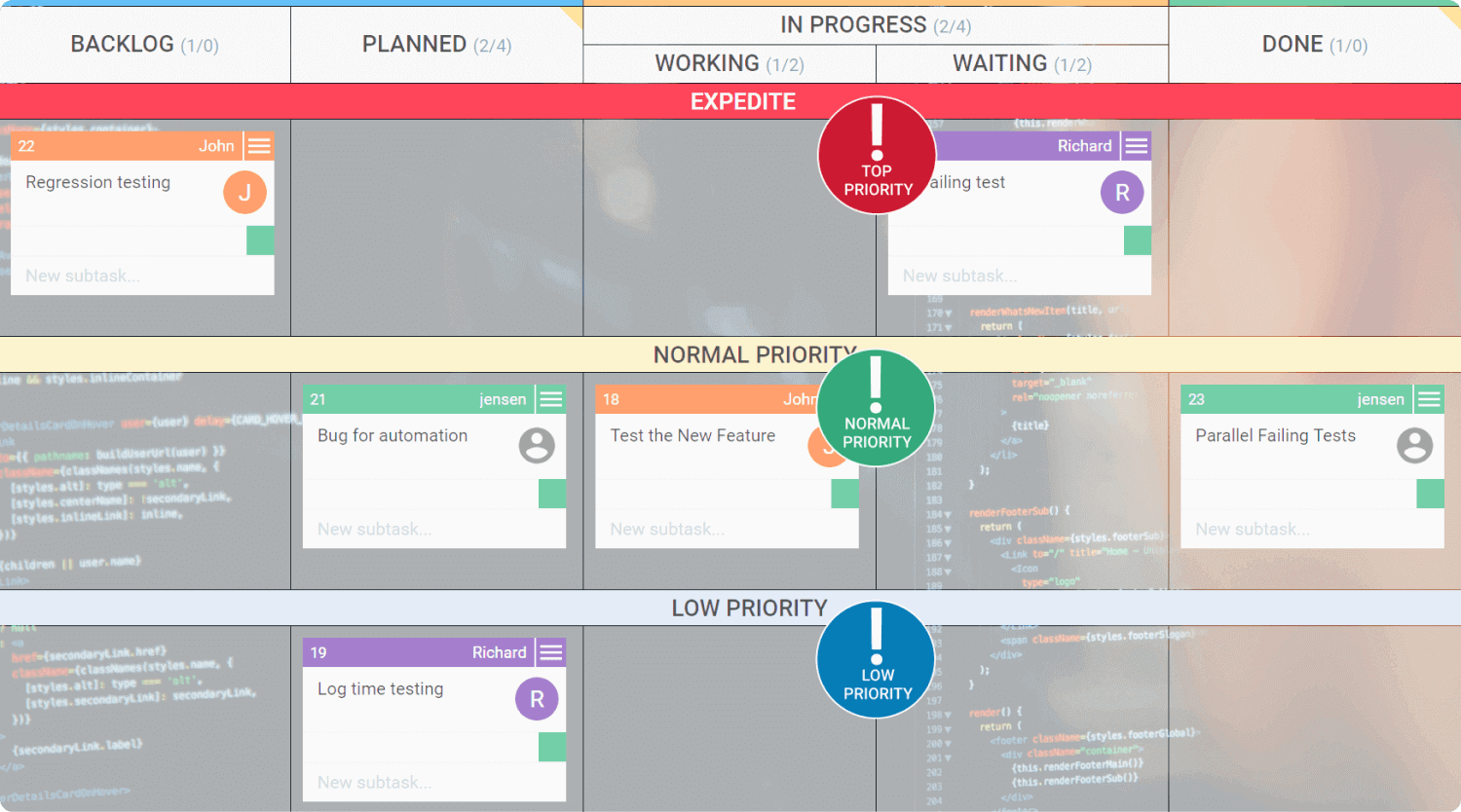 Using swimlanes on a kanban board to categorize work priority types
Protect capacity for interrupts and debt
Reserve capacity ranges for planned work (often 10–25%) and urgent unplanned requests (often 5–15%). Those numbers aren't universal. The point is forcing the conversation: How much of our system is allowed to be unpredictable? When the unpredictable percentage stays high, your governance is the problem, not the backlog.
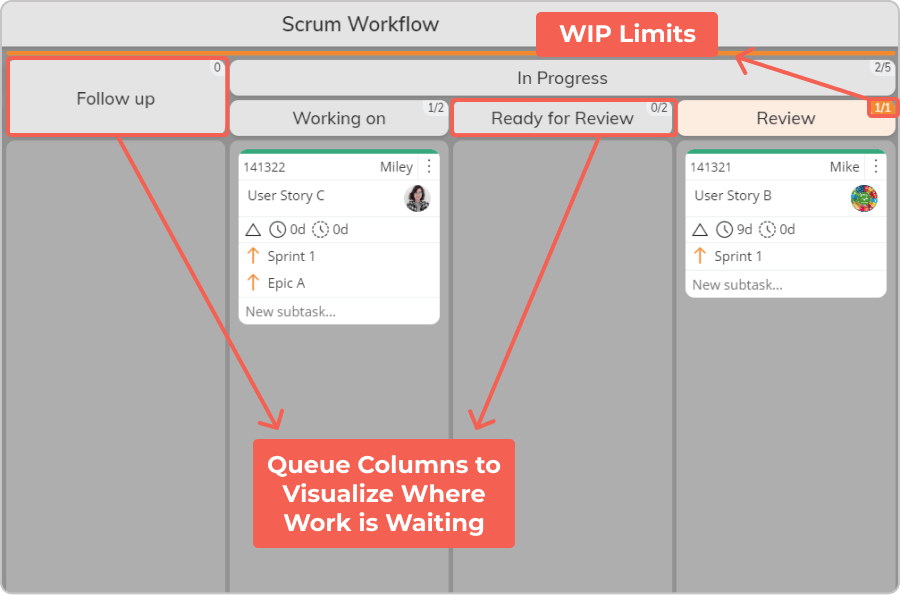 Visualizing work in progress limits and queue columns of a Scrum process
What Separates Backlog Prioritization Tools from Task Lists?
A basic task list can capture work. A backlog prioritization tool must help you make trade-offs and hold the line during execution. Here's what to look for:
Which Tools Offer Kanban Boards and Backlog Prioritization?
Let's be honest: many tools claim they do both. Few do both well without friction.
Jira + add-ons
A common setup using Jira Product Discovery and Software. It can work, but it's a multi-part system where priority lives in one place and execution in another, creating synchronization problems.
See how Businessmap differs from Jira →General work management tools
Asana, Monday, ClickUp can support prioritization through custom fields and formulas. The issue is consistency and governance: the tool won't protect your prioritization logic unless you build the discipline around it.
Ready to experience backlog prioritization that actually works?
EXPLORE KANBAN PROJECT MANAGEMENT
Nikolay Tsonev
Product Marketing | PMI Agile | SAFe Agilist certified
Nick is a seasoned product marketer and subject matter expert at Businessmap, specializing in OKRs, strategy execution, and Lean management. Passionate about continuous improvement, he has authored numerous resources on modern-day management. As a certified PMI practitioner and SAFe Agilist, Nick frequently shares his insights at Lean/Agile conferences and management forums.