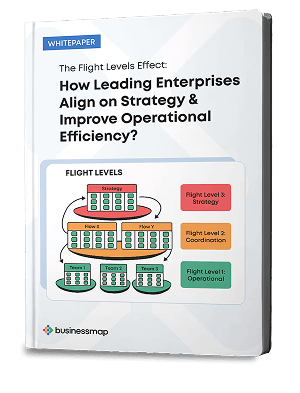
Effective Kanban board templates are not one-size-fits-all. They need to align with your team's workflow, complexity, and project needs. The best Kanban board layouts support flow, visibility, and strategic alignment.
Let's look at several custom Kanban templates for different scenarios.
What Makes a Kanban Board Template Effective?
The importance of a Kanban board template lies in its ability to mirror your team's actual workflow. A good template drives efficiency by organizing work in a way that's intuitive, scalable, and focused on maximizing throughput while maintaining quality.
Key characteristics of an effective Kanban board template include:
Realistic Workflow Representation
Templates should reflect the actual states work moves through in your team's process. For example, an IT support board should have distinct columns for requests, in progress area, and customer verification, as these stages represent how work truly flows.
Clear Columns, Swimlanes, and Multiple Workflows on a Single Kanban Board
A template's columns should represent the stages of work. Kanban swimlanes can be used to separate work by type, project, or team.
Work-In-Progress (WIP) Limits
One of the most important features of an effective Kanban board is using WIP limits, which help reduce multitasking and increase focus.
Custom Fields for Prioritization
Kanban boards should not only track work status but also prioritize it. Custom fields such as Priority or Deadline ensure that high-priority tasks don't get lost in the shuffle.
How Many Columns Should Your Kanban Board Template Have?
The number of columns on a Kanban board should reflect the complexity of your workflow. What's important is to have the option to customize this part.
Use 3–5 Columns for Simple Workflows
For simple workflows, a 3-5 column layout is sufficient to visualize the basic flow of work.
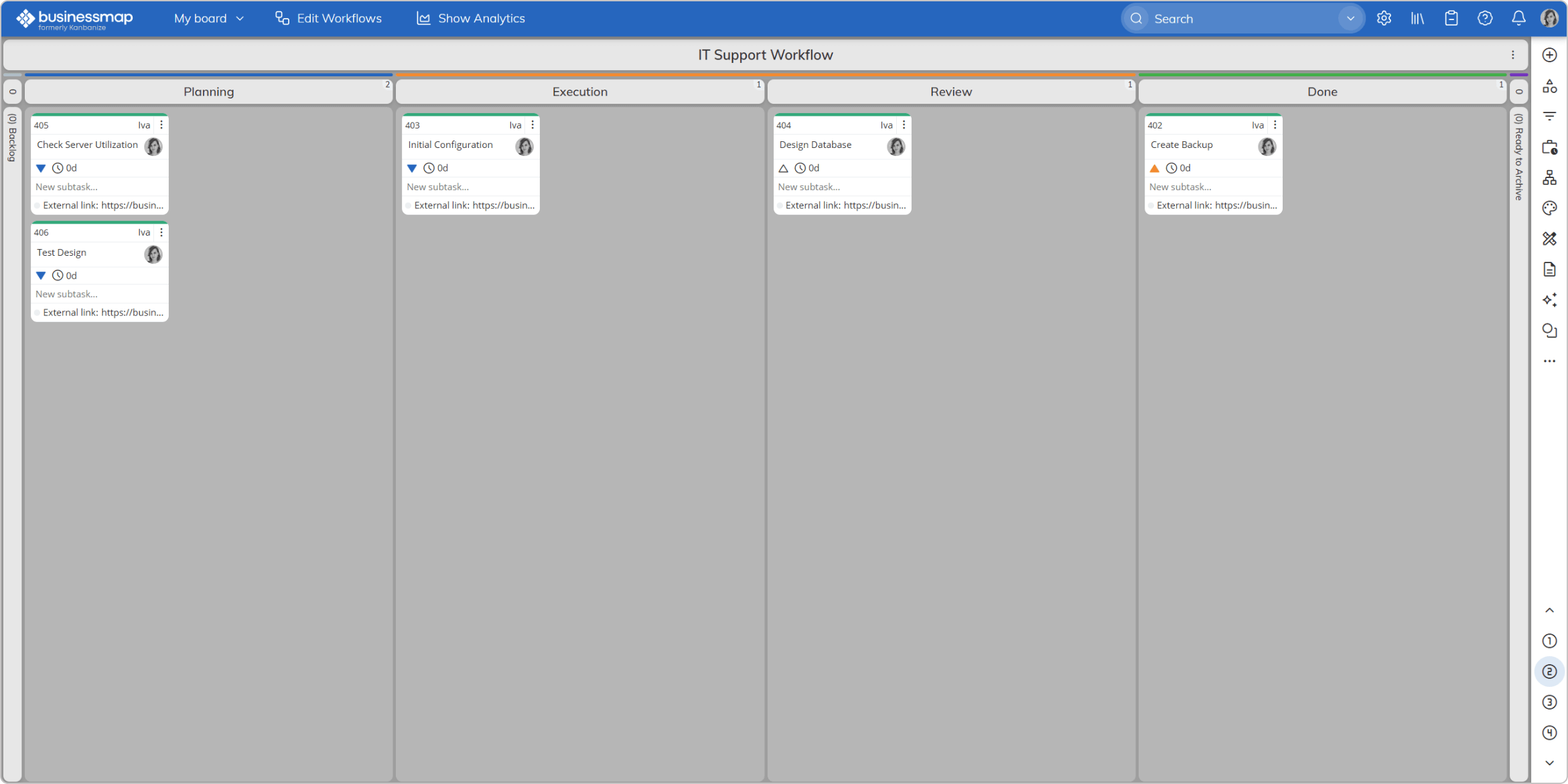 Visualizing an IT support workflow using a kanban board
Use 6–10 Columns for Complex Workflows
For more complex workflows, additional columns help separate stages of work that require more oversight. For example, Engineering teams often need distinct stages for Feasibility Analysis, Design, Validation, and Manufacturing. More columns can also be used to track dependencies, testing, and Approval stages.
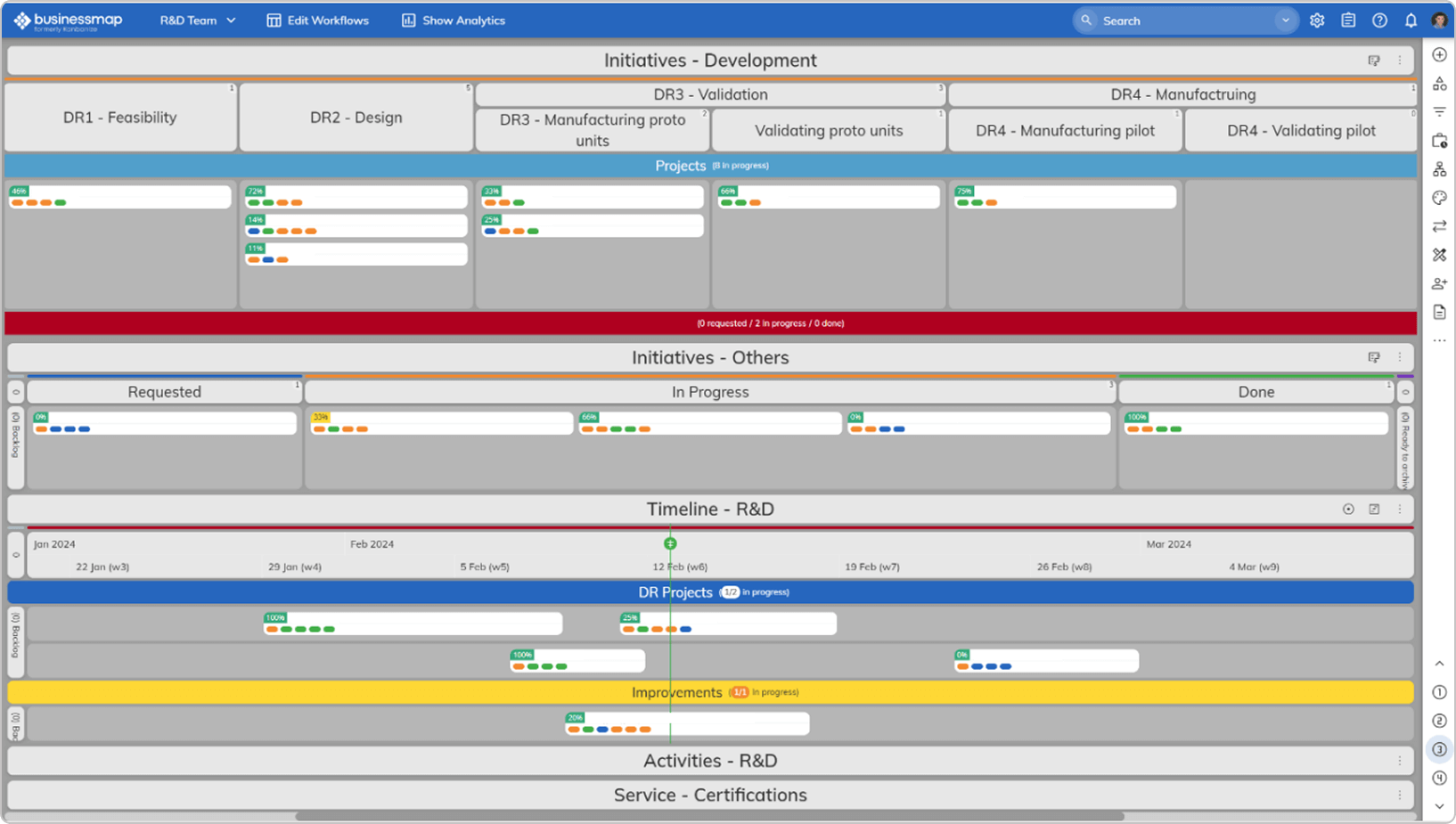
Advanced engineering work process mapped on a kanban board in Businessmap
How to Use Kanban Board Templates for Different Teams and Project Types?
Each team and project type has its own set of needs when it comes to Kanban. Below, we'll explore how to adapt a Kanban board template for various project types, from software development sprints to marketing campaigns.
Sprint Kanban Template
Software development sprints require Kanban boards that track task progress and support backlog prioritization and iteration planning.
Typical columns for a Sprint Kanban template might include:
- Backlog (Prioritized by Business Value)
- Ready for Development
- In Progress
- Code Review
- Testing
- Done
This setup ensures a clear workflow while limiting WIP and providing transparency throughout the sprint process.
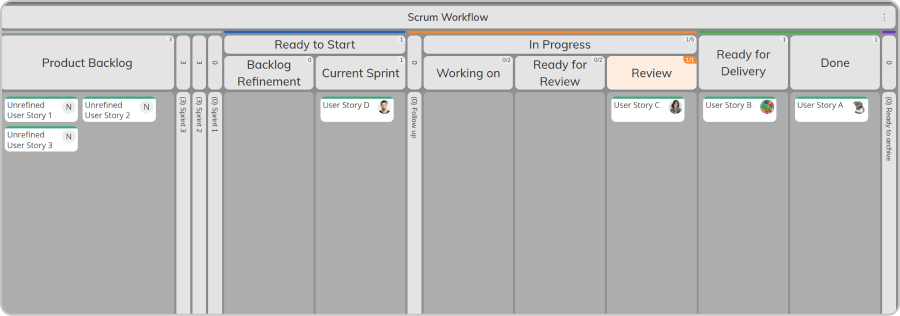 Basic Scrum workflow on a Kanban board
For hybrid Scrums, watch how to manage Scrum sprints and backlogs in Businessmap
Support Team Kanban Template
For support teams, Kanban boards help manage customer requests, issues, and tickets with clear visibility of each step in the support process.
Typical columns for a Support Team Kanban board might include:
- New Requests
- In Progress
- Waiting on Customer/Vendor
- Verification
- Resolved
WIP limits are crucial here to prevent teams from being overwhelmed with requests. Additionally, Classes of Service can be used to prioritize high-priority issues that need to be addressed immediately, such as Critical, Incidents, Maintenance, etc.
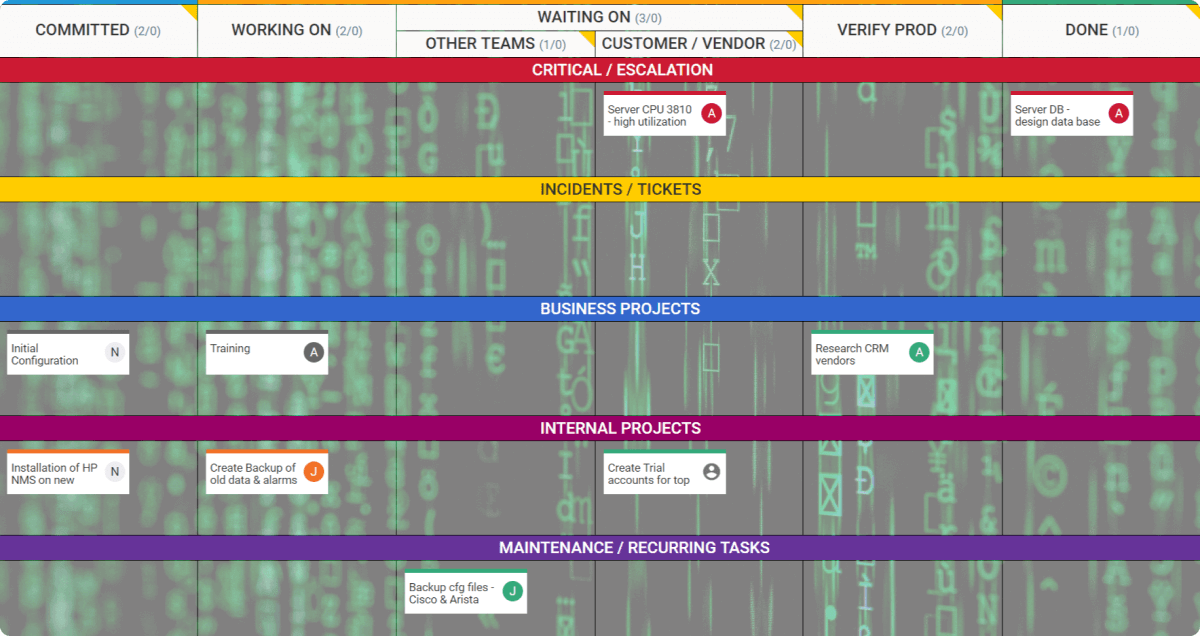 Support kanban board template with lanes to distinguish types of work
Procurement Kanban Template
A Kanban board for procurement helps teams manage the flow of purchase orders, vendor negotiations, and deliveries.
Columns might include:
- Request Submitted
- Vendor Evaluation
- Approval
- Negotiation
- Ordered
- Delivered
Each column helps visualize the procurement pipeline from initial request to product delivery.
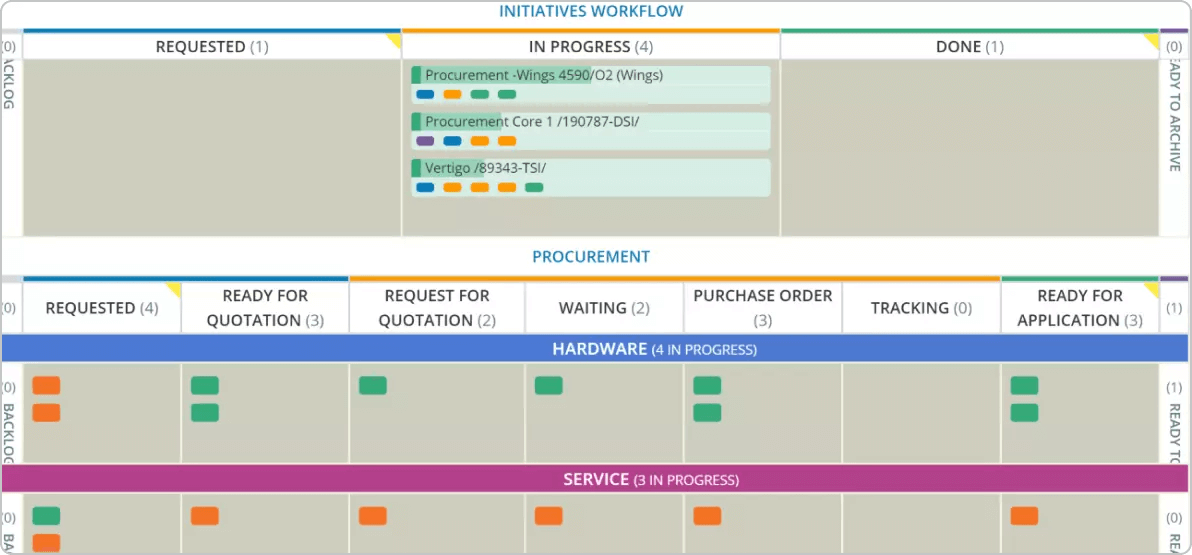 Procurement workflow stages and work items progress on a kanban board
Client Insight: As part of their lean transformation, our client Encoparts' International Purchasing team used swimlanes on their Kanban board to visualize part demand across three service classes ("Hard," "Medium," and "Easy"). The color-coded work cards corresponded to different suppliers responsible for fulfilling the orders. Additionally, they defined columns for "Queues" (waiting) and "Activities" that add value, creating a clear distinction between tasks in progress and those requiring further attention. Read Encoparts Case Study
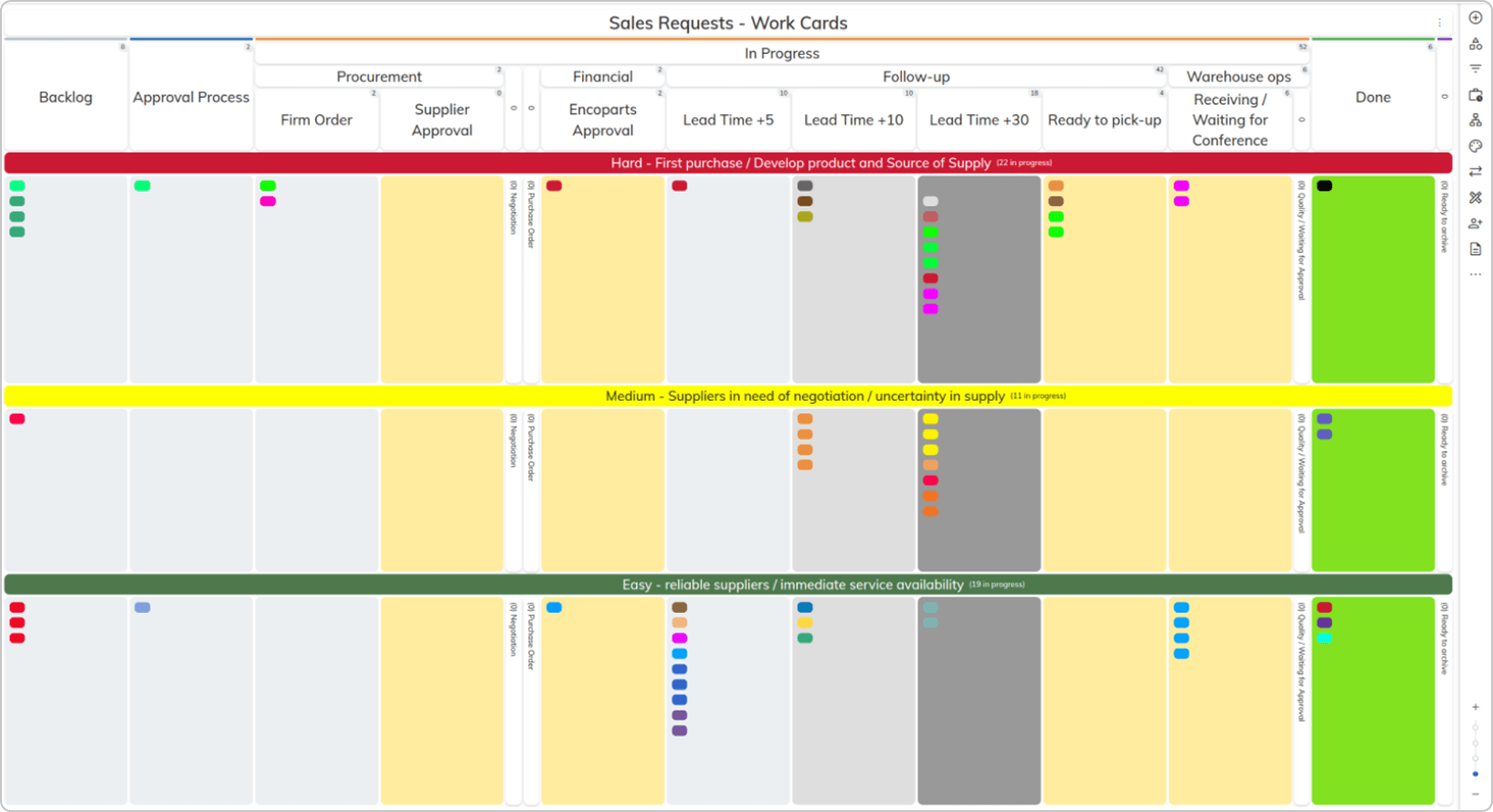 Visualizing the advanced International Purchasing division workflow on a kanban board
Mechanical Engineering Workflow Kanban Template
Engineering teams require a Kanban board that separates idea generation, feasibility analysis, and development stages.
Columns could include:
- Idea/Backlog
- Feasibility
- Prototyping
- Testing
- Release
Additionally, swimlanes can be used to track different product lines or engineering teams working on different projects.
Client Insight: The Engineering team at our client implemented a customized Kanban board in Businessmap, evolving it over time to meet their needs. The board visualizes a range of work, including Project Workflows for long-term projects, seven Services Workflows for smaller projects and deliverables, and one Activities Workflow for daily tasks. This customization allowed the team to effectively manage and visualize projects of various scales and timelines, improving overall operational clarity and efficiency. Read Client Case Study
Engineering workflow kanban board
Marketing Campaign Kanban Template
Marketing teams often handle multiple campaigns and initiatives simultaneously. A Kanban board for marketing could include the following columns:
- Ideas
- Planning
- Content Creation
- Review
- Launch
- Post-Launch Analysis
In addition, marketing teams often use swimlanes to separate various campaign types (e.g., Email Campaigns, Social Media Campaigns, etc.), making it easier to track their progress.
Client Insight: Our client Devot used their Kanban board to build a clear prioritization system for the Marketing division, ensuring alignment with company-wide initiatives. By establishing structured stages for idea generation, refinement, and commitment directly on the board, they created a transparent, disciplined flow from concept to execution. Read Devot Case Study
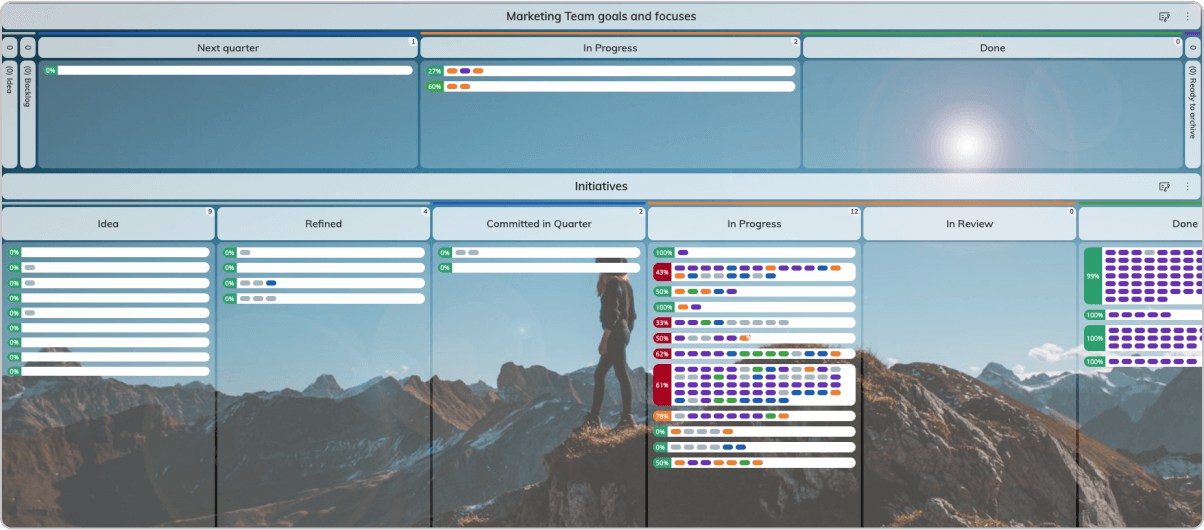 Visualizing the marketing team's goals refinement process on a kanban board
Portfolio Management Kanban Template
Portfolio management teams handle multiple projects, each with different stages and dependencies. A Kanban board for portfolio management could include:
- Funnel (Idea phase)
- Review
- Approved
- In Progress/Launching
- Monitoring
- Done
By using swimlanes, portfolio managers can track multiple projects simultaneously while maintaining visibility into dependencies and progress across teams.
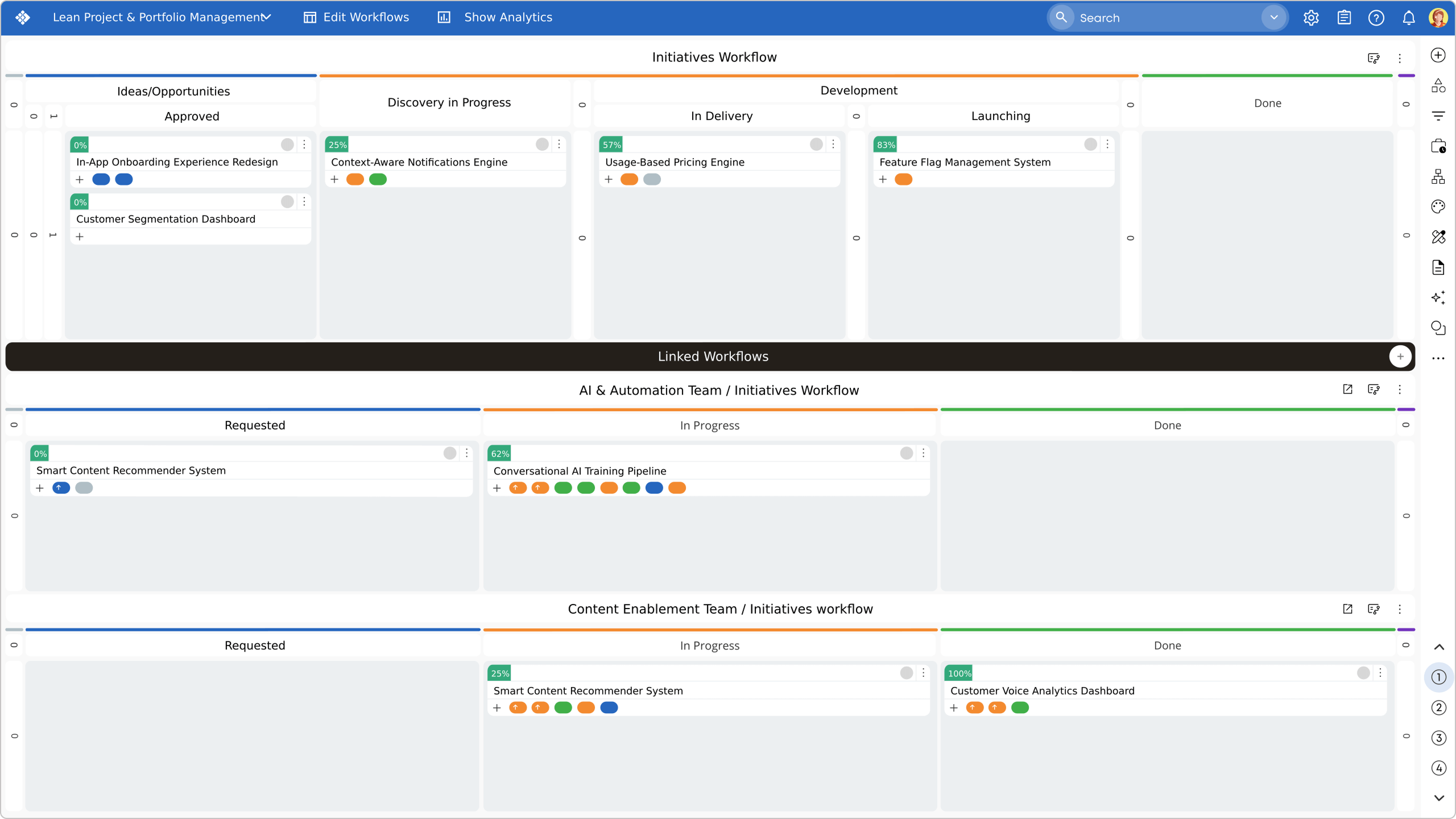 Portfolio Management Kanban board with multiple swimlanes
OKRs Portfolio Kanban Board (Bonus)
You can use an OKR board template to create a centralized management hub offering:
- High-level OKR visualization
- Cross-team workflow integration
- Build a hierarchical structure for work activities
- Maintaining visibility of the overall strategy
Businessmap offers an OKR board setup that aligns top-level goals with team execution, helping you realign your management processes.
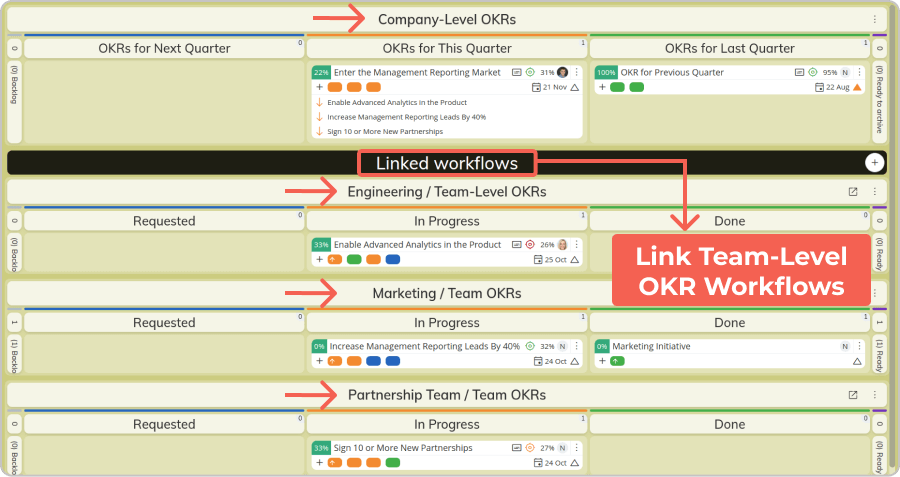
Cascading OKRs management board with connected team workflows
Flight Levels Kanban Board Template (Bonus)
Organizations can implement the Flight Levels concept to align projects by providing a shared platform that connects strategic goals with team execution. Here's how it works in Businessmap:
- Map Strategy with Visual Whiteboards (Flight Level 3): Use Whiteboards to lay out OKRs, KPIs, and strategic themes.
- Link Strategic Goals to Coordination Boards (Flight Level 2): Connect strategic goals to initiatives on Portfolio Boards.
- Connect Coordination to Team Execution Boards (Flight Level 1): Link initiatives to team-level execution boards for transparent task tracking.
- Monitor Flow, Progress, and Alignment with Dashboards: Use real-time dashboards to track the percentage of work tied to strategic objectives, monitor flow efficiency, identify blockers, and keep leadership informed on progress.
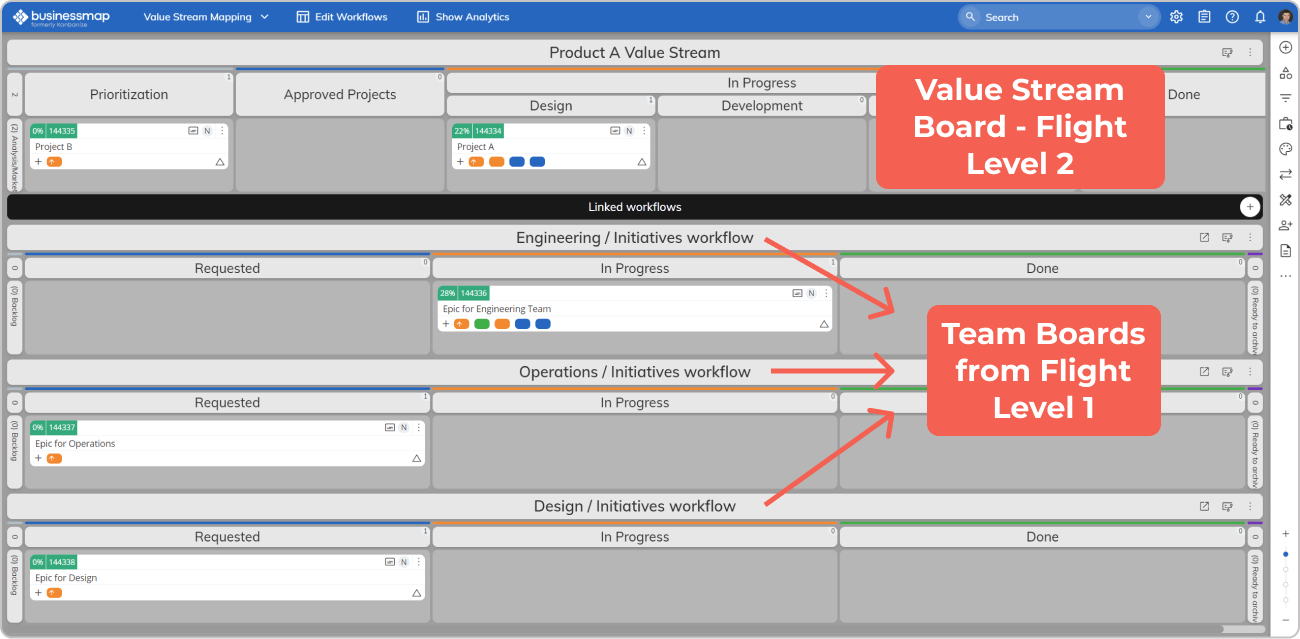 Connecting flight level 2 and flight level 1 items in Businessmap (projects-epics)
What Are the Best Kanban Templates?
The best Kanban templates reflect your team's workflow and support scalability and flexibility as your organization grows. Businessmap's Kanban board templates are uniquely adaptable, offering layouts that can be customized to various project types and workflows.
Why Businessmap?
- Template Variety: Businessmap is successfully used for engineering, procurement, support, software development, and more.
- Customization: Businessmap allows you to customize swimlanes, WIP limits, columns, and fields to create a Kanban board that works for your team.
- Scaling Across Teams: You can extend your template layouts to multiple teams and projects. Use swimlanes for team-based workflows or to track project portfolios, all on a single Kanban board.
- Analytics & Automations: Beyond just templates, Businessmap offers advanced analytics to track work progress, automations to speed up workflows, or real-time AI-enabled insights into your board's performance.

Iva Krasteva
Content Strategist | Agile Practitioner | Kanban Certified
Iva is a Kanban-certified Agile expert with hands-on experience in SEO, content creation, and Lean practices. She has published dozens of articles on Lean, Agile, and Kanban practical applications. Iva actively promotes collaborative, flexible work environments and regularly shares process optimization insights through writing.