Key Takeaways
- Hybrid project management software enables teams to combine flexibility with structured planning.
- The best hybrid project management tools support multiple methodologies within a single system.
- Real-time visibility, dependency management, and analytics are essential for hybrid workflows at scale.
- Businessmap is the strongest choice for enterprises managing complex hybrid project portfolios.
What Is Hybrid Project Management Software?
Hybrid project management software is a digital tool designed to support multiple delivery approaches simultaneously, combining Agile practices (Scrum, Kanban, flow-based delivery) with predictive, plan-driven methods like Waterfall.
Unlike Agile-only tools, hybrid project management tools don't assume all work is iterative and flexible. And unlike Waterfall-only tools, they don't rely exclusively on upfront planning and strict phase gates. Instead, modern HPM platforms combine structured planning elements - timelines, milestones, dependencies - with Agile practices like iterations, WIP limits, and continuous flow to allow organizations to tailor execution based on the nature of the work, the level of uncertainty, and business constraints.
That flexibility is why hybrid project management has become the default reality for most organizations.
Core Capabilities of Hybrid Project Management Tools
Project & Portfolio Visibility
Hybrid execution demands visibility beyond individual teams. Effective platforms provide a unified view across ways of working, showing how initiatives progress at the project, program, and portfolio levels.
This includes real-time insight into delivery status, risks, and progress, tailored for both executive decision-making and team-level execution.
Dependency Management at Scale
Dependencies are where hybrid execution most often breaks down.
Strong hybrid project management software makes cross-project and cross-team dependencies explicit, including both internal handoffs and external vendor or regulatory dependencies. Visualizing these relationships enables teams to assess dependency risk early, proactively manage blockers, and prevent cascading delays across portfolios.
Workflow Flexibility
Hybrid platforms must adapt to the work, not the other way around.
That means customizable workflows that support:
- Agile teams running sprints or continuous flow
- Plan-driven initiatives using milestones and phases
- Kanban and Gantt views coexisting within the same system
Hybrid governance should emerge from shared visibility and policies, not by forcing all teams into a single methodology.
Resource & Capacity Management
Hybrid portfolios often share the same people across very different types of work.
Effective tools help organizations manage shared resources across methodologies, detect bottlenecks, and balance demand against real capacity. Instead of discovering overload after deadlines slip, leaders can see constraints early and adjust plans with confidence.
Analytics, Forecasting & AI Insights
Modern hybrid project management is increasingly data-driven.
Leading platforms combine historical performance data with delivery forecasting, risk prediction, and scenario analysis. AI-assisted insights help teams understand not just what is happening, but why and then what's likely to happen next. Many teams leverage Claude or ChatGPT to generate these insights, using advanced AI to analyze patterns and support smarter, faster decision-making.
This shift from static reporting to predictive decision support is a defining capability for 2026-ready hybrid platforms.
Integrations
Hybrid execution rarely happens in isolation.
Enterprise-grade tools integrate with:
- ERP and financial systems for governance and cost tracking
- BI tools for portfolio analytics
- Collaboration platforms for day-to-day coordination
The goal isn't to replace existing tools overnight, but to create a connected execution layer across them.
Pricing, TCO & Scalability
One of the biggest gaps in most tool comparisons is long-term cost.
When evaluating project management software, organizations should look beyond license price and consider 3–5 year total cost of ownership (TCO), including:
- Licensing and user scaling
- Configuration and customization effort
- Ongoing admin and maintenance overhead
- Cost of integrating multiple tools to compensate for missing capabilities
In practice, tools that appear inexpensive often become costly as complexity grows, while platforms designed for scale reduce operational overhead over time.
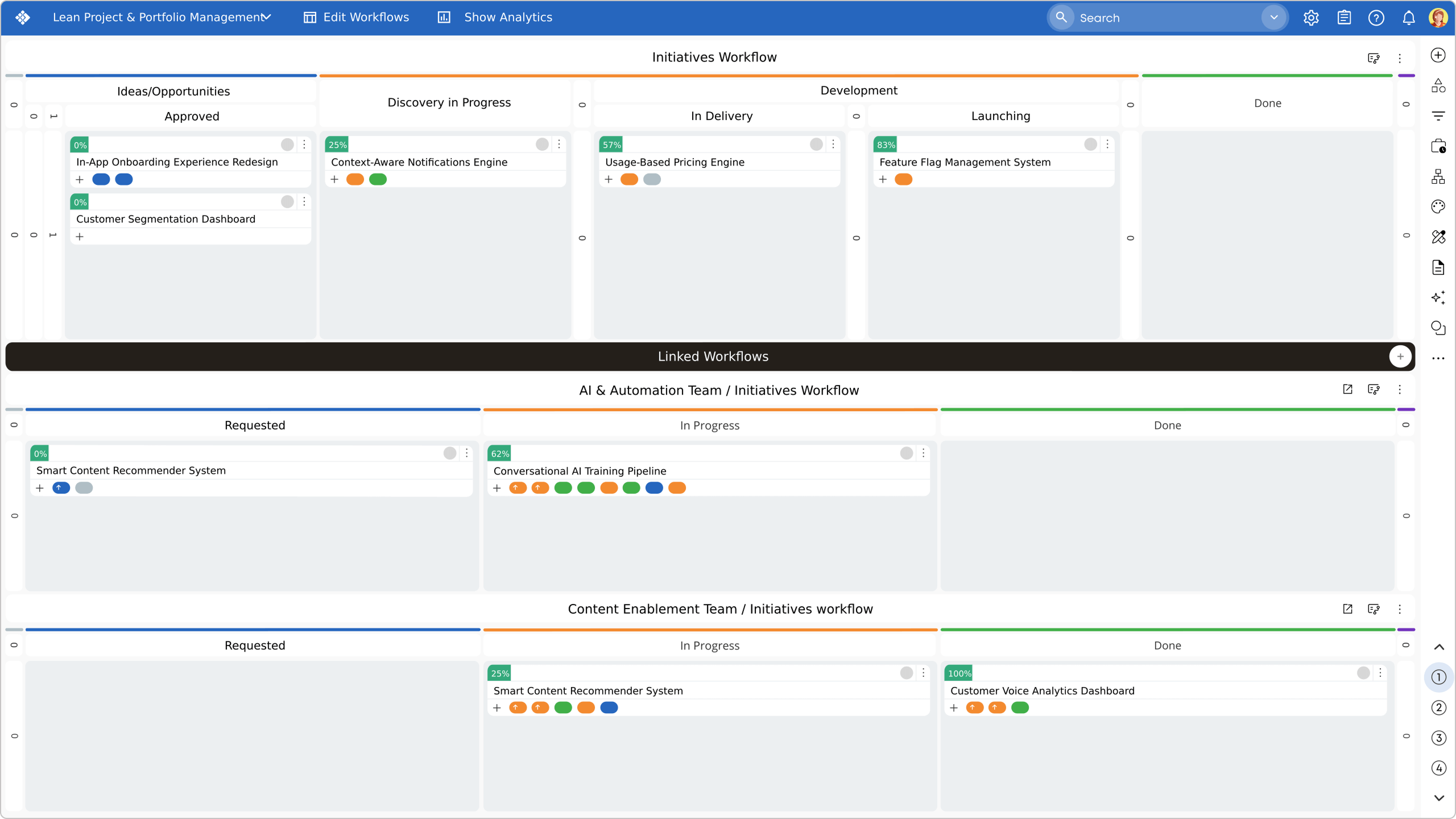 Visualizing strategic and operational coordination boards in a single view in Businessmap
The Best 7 Hybrid Project Management Software in 2026
1. Businessmap
→ Best for: Enterprises managing complex hybrid portfolios across teams and departments.
Businessmap is designed specifically for organizations managing hybrid workflows across teams, departments, and portfolios. It allows Agile, Kanban, Scrum, and Waterfall practices to coexist within a single, connected system without sacrificing visibility or control.
Teams can visualize work using the best Kanban boards, sprints, portfolio timelines, and dynamic Gantt views, linking strategy to execution. These tools enable capacity-based planning, project reviews, initiative adjustments, and dependency mapping. Advanced portfolio-level views help leaders coordinate complex work across the organization.
What truly differentiates Businessmap is its analytics, coupled with an AI engine that analyzes charts to deliver feedback on trends, improvement tips, and interactive Q&A conversations. This makes workflow metrics accessible, empowering teams to manage uncertainty, cut delays, and boost delivery predictability.
Case Study: Hybrid Delivery in Practice
Software development company Devōt used Businessmap to run Agile delivery teams alongside plan-driven client projects in one system. By visualizing dependencies and workflows end-to-end, they improved coordination across hybrid engagements and accelerated responses to changing priorities without forcing teams into a single methodology.
See how hybrid project work scales with Businessmap. Read the complete Devōt case study↗
2. Smartsheet
→ Best for: Teams transitioning from spreadsheets to collaborative planning.
Smartsheet supports structured project planning and reporting, offering a variety of views. It works well for customizing and automating workflows and aligning multiple teams on projects.
Key Features
- Gantt, calendar, table, board, timeline views
- Unlimited reports and forms
- Workload tracking
- Activity logs
- Role-based sharing available to the custom solution packages
- AI tools available to the custom solution packages
- Integrations: Microsoft Office 365, Google Workspace, Slack, Power BI, Tableau
- Multiple add-ons available
3. Wrike
→ Best for: Cross-functional teams that need flexible task and timeline management.
Wrike supports hybrid workflows with task dependencies and multiple views. It is commonly used for cross-functional coordination where teams mix Agile boards with structured planning. However, its portfolio forecasting and advanced analytics are more limited than those of enterprise-focused hybrid platforms.
Key Features
- Task management
- Gantt charts
- Custom fields, workflows & statuses
- Shared team calendars
- Document collaboration
- Workflow automation (automation actions limits apply depending on the plan)
- Time tracking
- Roles assignment, budgeting, team utilization, and performance dashboard available with the most advanced custom plan
- Customized reports
- Integrations: Open RESTful API, Google Drive, MS OneDrive, Salesforce, NetSuite integration (available as an add-on), QuickBooks, and Power BI native integrations are available with the most advanced custom plan
4. Asana
→ Best for: Task-centric teams managing lightweight hybrid projects.
Asana is popular for task and project coordination, offering list, board, and timeline views that support lightweight hybrid workflows. Its ease of use makes adoption quick across teams. It's specifically popular among creative teams. For large organizations managing interdependent portfolios, Asana may lack deeper resource modeling, forecasting, and risk analytics.
Key Features
- Activity feed
- Visualization of workload
- Timeline, Gantt, list, board, calendars views
- Workflow builder
- Project dashboards
- Unlimited automations
- AI tools, including AI Studio (with additional credits available for purchase)
- Goals and native time tracking available with the high-end plans
- Free integrations: 100+ tools, including Slack, Zoom, Google Workspace, and Microsoft 365
- Integrations with Salesforce, Tableau, and Power BI available with the high-end plans
5. Nimble
→ Best for: Managing complex projects using multiple methodologies
Nimble is an AI-powered project and work management platform designed for enterprises managing large and complex projects - especially when traditional and agile methods need to coexist. Nimble adapts to your operating model, supporting multiple approaches in one system, with rollups for program, portfolio, and enterprise-level visibility.
Nimble's AI capabilities help teams move faster in all phases of projects, from planning to execution and monitoring/ tracking. Nimble's in-product assistant (Nimble Buddy) provides a Conversational interface and provides answers, insights, and project deliverables on demand.
Key Features:
- Hybrid Agile/Traditional project structures.
- Kanban boards, Gantt charts, and visual Dashboards.
- AI-powered project plan, scope, and report generation, work item similarity, auto-fill, and predictive analytics.
- Resource management with real-time visibility into availability, skills, and workloads.
- Project Portfolio Management capabilities.
- Business Forms, timesheets, and approval workflows for operational governance.
- Integrations with ERP/ CRM, accounting, and billing software, and DevOps toolchains.
6. Teamwork
→ Best for: Agencies and service teams that need client visibility and structured delivery workflows, with advanced features available on higher-tier plans.
Teamwork is tailored for organizations that manage projects for external clients and need structured collaboration with built-in transparency. Teamwork allows you to tailor your boards to your team's specific needs. It enables you to keep work progress on track, estimate time, and spot bottlenecks.
Key features
- Time tracking
- Gantt, list, and table views
- Clients' views for external stakeholders
- Teams and roles management
- Project templates for repeatable delivery
- Portfolio health, planned vs. actual, and status reports
- Automations (actions per month depending on the plan)
- Integrations: Zapier, Slack, MS Teams, Google Drive, Salesforce and NetSuite available with the higher-end custom plans
7. ONES.com
→ Best for: Organizations running Agile and Waterfall projects in parallel that need unified lifecycle and portfolio-level control.
ONES.com is a hybrid project and product management platform designed for teams that operate both Agile and Waterfall methodologies at the same time. It enables sprint-based execution and structured milestone planning within one system, making it well suited for complex, cross-department programs that require visibility beyond task-level tracking.
Key features
- Agile project management (backlogs, sprints, iterations, Kanban boards)
- Waterfall planning (milestones, Gantt charts, dependencies, approval stages)
- Portfolio-level dashboards for cross-team and cross-project visibility
- Requirements management across product and engineering teams
- Test management and bug tracking
- Custom workflows, statuses, and role-based permissions
- Workload, risk, and progress tracking across Agile and Waterfall initiatives
- Full lifecycle visibility from planning to delivery
Hybrid Project & Work Management Pricing Comparison (2026)
| Platform | Free Trial | Pricing | AI Tools | Add-Ons |
| Businessmap | Free trial available | €7.20/user/mo or $8.00/user/mo for 100 users when billed annually | All AI features included: AI Summaries, AI Analysis, AI Work Assistant, Smart Canvas | "If-this-then-that" business rules; SSO Security; API & Data Limits; Support & Implementation packages |
| Smartsheet | 30-day free trial available | $19/user/mo (3+ users, unlimited guests and viewers) Enterprise (10+ users): custom pricing |
AI formulas/text summaries available on Enterprise and custom solutions packages | Resource Management; Dynamic View; PPM Control Center; Data management; Secure process management. All add-ons included in the custom solutions package |
| Wrike | Free version + 14-day free trial | $25/user/mo (5-200 users); Enterprise/Pinnacle (5 to unlimited users): custom pricing | AI features vary by plan Wrike Copilot, Widget generation and Board assistant Usage packages for additional actions available for purchase |
Add-on support packages: Integrate, Whiteboard, two-way syncs with 22 integrated systems |
| Asana | Free plan available | Starter ~$10.99/user/mo; Advanced ~$24.99; Enterprise custom pricing |
AI Studio and AI automation features included in all paid plans with additional credits for purchase | Compliance management; Timesheets and Budgets; Permissions management |
| Nimble |
1-month free trial available | $10/user/mo - $26/user/mo; Enterprise custom pricing | AI-Agents available via add-on only | AI-Agents, OKRs, Business Rules, AI-Suggest, Advanced Integrations |
| Teamwork | 30-day free trial available | Paid plans from €10.99/user/month to €19.99/user/month (billed annually); Enterprise custom pricing plans | Teamwork AI is included in all plans; automation actions per month, depending on the tier | Available under the Enterprise custom plan: Advanced Security, including SSO functionality; Premium Support |
| ONES.com | Free plan (free forever) up to 30 seats |
Standard: $7 / seat / month (billed annually) Business: $16 / seat / month (billed annually) Enterprise: Contact sales |
All AI abilities are eligible in paid plan. |
ONES Task: $5 / seat / month ONES TestCase: $5 / seat / month ONES Copilot: $5 / seat / month |
How to Choose a Hybrid Project Management Software?
When evaluating options, consider:
- Team size and structure: single teams vs multi-department portfolios
- Portfolio complexity: number of dependencies and shared resources
- Governance needs: compliance, predictability, and reporting
- Integration ecosystem: existing delivery and business systems
FAQs
What key features should hybrid PM software include?
Customizable workflows, Kanban and Gantt views, dependency management, resource planning, and project- and portfolio-level visibility are essential for hybrid execution.
What are the best hybrid project management tools for large teams?
Platforms like Businessmap are designed to scale across teams and portfolios, while maintaining project visibility and coordination in hybrid environments.
Are there enterprise hybrid PM platforms with real-time collaboration?
Yes. Enterprise-grade tools such as Businessmap provide shared dashboards, live updates, and role-based views for both teams and executives.
Can hybrid project management software support both Agile and Waterfall without compromise?
The best platforms allow different methodologies to coexist, rather than forcing teams into a single model or toolset.
Ready to see Businessmap in action?

Iva Krasteva
Content Strategist | Agile Practitioner | Kanban Certified
Iva is a Kanban-certified Agile expert with hands-on experience in SEO, content creation, and Lean practices. She has published dozens of articles on Lean, Agile, and Kanban practical applications. Iva actively promotes collaborative, flexible work environments and regularly shares process optimization insights through writing.