Key Takeaways
-
The best Agile platforms combine flexibility, scalability, and analytics. Look for customizable workflows, automation, Lean/Agile metrics, and forecasting capabilities that improve flow efficiency and predictability.
-
Enterprise agility requires more than task tracking. Tools that connect strategy, portfolios, OKRs, and execution enable real-time alignment and executive visibility.
-
Visibility drives performance. Kanban boards, dashboards, cycle time tracking, throughput analysis, and forecasting improve decision-making and reduce bottlenecks.
-
Scalability is a strategic differentiator. As organizations grow, portfolio-level oversight, dependency management, and outcome-based goal tracking become essential.
-
Choose tools based on context, not popularity. Developer-heavy environments benefit from Jira or Azure DevOps, while cross-functional teams often need stronger collaboration and portfolio views as offered by Businessmap.
What Is Agile Project Management Software?
Agile project management software is a digital solution designed to help organizations and teams plan, track, and deliver work iteratively. Agile tools support companies by improving visibility into work processes, facilitating collaboration, and encouraging rapid feedback.
With operational agility becoming integral to today's businesses and the need for digital transformation, Agile project management tools help you spot bottlenecks early, respond to change quickly, and keep teams aligned.
What Are the Key Features of Agile Project Management Software?
One of the most critical aspects of a useful Agile PM tool is flexibility so you can adapt it to your organizational needs. Not vice versa! It's also essential for your tool of choice to be scalable so you can apply it across multiple teams and management levels in your company. As Agile is all about continuous improvement, look for a solution that enables you to collect data and measure whether you are achieving your efficiency goals.
If you're evaluating tools, here's what to look for:
-
Customizable workflows: adapt the software to your process, not the other way around.
-
Project visibility: Kanban boards, roadmaps, and real-time dashboards.
-
Collaboration: comments, file sharing, integrations.
-
Automation: recurring tasks, notifications, WIP limits.
-
Analytics: cycle time, throughput, burndown charts, forecasting.
-
Scaling support: portfolio views, OKRs, cross-team management.
Tip: If a tool doesn't make work visible in seconds, it's not agile - it's overhead.
What Are the Best Project Management Tools for Agile Teams in 2026?
-
Businessmap stands out for enterprise-wide visibility, OKR alignment, flow analytics, and portfolio management.
-
Jira and Azure DevOps are strong options for software development teams.
-
Smartsheet, Wrike, Asana and ProofHub support cross-functional collaboration.
-
Digital.ai, Targetprocess, and Celoxis focus on Agile at scale.
-
Linear and Zoho Sprints fit smaller Scrum and product teams.
If your priority is scaling agility across departments while aligning strategy with execution, enterprise-ready platforms like Businessmap offer broader visibility and advanced analytics.
Plan fast. Adapt faster. Deliver confidently.
14 Best Agile Project Management Software Compared
Choosing the right tool often comes down to a few critical differences. If you want a quick overview before diving into the details, check out our side-by-side comparison table that highlights how these solutions stack up across core criteria.
| Tool |
Best For |
Key Features |
Pricing Information |
Capterra Rating |
| Businessmap |
Scaling visibility and alignment across the organization |
Kanban boards, project tracking, OKRs, native AI tools, performance analytics and forecasting, deep integrations |
Standard; Enterprise plan; Less than ~$7/user/mo (for 1000+ users); Free trial available |
4.8/5 |
| Jira |
Software development teams |
Scrum & Kanban boards, bug tracking, burndown charts, automation |
Free; Standard: $8.60/user/mo; Premium: $17 user/mo; Enterprise (custom pricing) |
4.4/5 |
| Smartsheet |
Cross-functional projects |
Gantt charts, resource management, reports, file sharing |
Pro: $9/user/mo; Business: $19/user/mo; Enterprise (custom pricing) |
4.5/5 |
| Celoxis |
Scaling Agile & portfolio visibility and cross-functional projects |
Gantt charts, Kanban boards, resource management, Agile backlogs, BI-quality dashboards, data-driven decisions |
Cloud from $10/user/mo; Advanced tiersup to $45; On-premise (custom pricing) |
4.4/5 |
| Wrike |
Marketing & services teams |
Gantt charts, customizable workflows, time tracking, Kanban boards |
Free plan; Team: $10/user/mo; Business: $25/user/mo; Enterprise & Pinnacle plans: (custom pricing) |
4.4/5 |
| Asana |
Creative/collab teams |
Roadmaps, project timelines, workload view, goals tracking |
Free plan; Starter: $13.49/user/mo; Advanced: $30.49/user/mo; Enterprise + (custom pricing) |
4.5/5 |
| Teamwork |
Agile beginners |
Kanban boards, workload management, budget tracking |
Free plan; Deliver: $13.99user/mo; Grow: $25.99user/mo; Scale & Enterprise: (custom pricing) |
4.5/5 |
| ProjectManager |
Hybrid PM (Agile + Waterfall) |
Scrum boards, product roadmaps, dashboards, reporting |
Team: $17/user/mo; Business: $30/user/mo; Enterprise (custom pricing) |
4.1/5 |
| Digital.ai |
Enterprise-level agility |
Portfolio planning, release tracking, SAFe/Scaled Agile support |
Custom pricing |
4.0/5 |
| Targetprocess |
Scaling frameworks (SAFe/LeSS) |
Dependency management, portfolio view, business alignment |
Custom pricing |
4.5/5 |
| Azure DevOps |
Development teams already invested in the Microsoft universe |
Agile boards, DevOps integration, enterprise-level security and governance |
Free for the first 5 users;
Basic + Test Plans: $52/user/month |
4.4/5 |
| Linear |
Small to mid-sized product and engineering teams |
Lightweight Agile workflows, Roadmap and Project Views, Integrations and Issue Tracking |
Basic plan at $10/ user/ month for 5 teams; $16 per user/month for unlimited teams;
Enterprise (custom pricing) |
4.3/5 |
| Zoho Sprints |
Scrum teams |
Epics, Scrum boards, team collaboration tools, Velocity tracking |
Free plan for up to 3 users;
Starter: €1 per user, per month (minimum 12 users); Premier: €6 per user/month (billed monthly); Enterprise: €7.50/user/month. |
4.5/5 |
| PoofHub |
Small to medium-sized teams searching for strong communication features |
Multiple project views, Team collaboration tools, Project reporting, Proofing tools |
Essential at $50/mo; Ultimate Control at $99/mo. |
4.5/5 |
| Productive.io |
Agencies, consultancies, and professional services teams |
Resource planning, budgeting, time tracking, invoicing, profitability reporting, Agile project management, forecasting |
Essential: $10/user/mo (billed annually); higher-tier plans available; free trial |
4.6/5 |
1. Businessmap
Businessmap is an Agile project and portfolio management software based on the Kanban method. It allows users to visualize projects, track their progress, and optimize workflow efficiency to deliver value to the market faster. In addition, the software comes with scaling capabilities that help you apply it across multiple teams or the entire organizationto achieve full organizational transparency. One of the platform's superpowers is its ability to deliver a clear work structure – from visualizing projects or strategic initiatives to breaking them down into multiple levels of work items and tracking their progress from "Requested" to "Done". Furthermore, the built-in OKR functionality allows you to map projects to your strategic objectives.
In Businessmap, users can use historical delivery data to plan their projects, get automatic status updates, and quickly adapt to changes.
Key Features
- Work boards
- Whiteboards
- AI tools and smart canvases
- Project timelines
- Portfolio, Management & Team Workspaces
- Customizable workflows
- Automation capabilities
- Analytics & Lean/Agile metrics
- Project forecasting
- Automated project status reporting
- Dependency management
- Goals and KPIs management
- Integrations with multiple digital tools such as Power BI, Microsoft Teams, Tableau, Google Data Studio, Google Drive, Github, Zapier, etc.
Considerations
- Expect an adjustment period
- Limited mobile app functionality
Pricing & Training
-
Standard & Enterprise tiered plans
-
For implementations of 1000+ users, Businessmap costs less than $7/user/month, including automations, goals management, project portfolio management, or workflow customization.
-
Free trial available.
- Help center, self-serve onboarding, video tutorials, a highly responsive support team.
- Dedicated success manager, training sessions, and migration support available for Enterprise plan users.
Businessmap is the most flexible software
to gain full work visibility across teams & portfolios
2. JIRA
JIRA is a widely used Agile project management tool, most suitable for software development teams. It offers a set of features and supports custom Scrum and Kanban workflows. The software allows you to create visual roadmaps of your projects, track work progress, and automate certain project management activities.
With JIRA, software teams can track bugs, easily collaborate, create sprint estimates, assign tasks to different users, etc. Although mostly Scrum-oriented, the software includes multiple charts to measure workflow performance, such as Burndown and Burnup.
Key Features
- Scrum & Kanban Boards
- Roadmaps
- Project Estimations
- Agile reporting
- Custom filters
- Pre-built workflows
- Process automation
- Bugs and defect management
- Deep Atlassian ecosystem (Confluence, Bitbucket) + hundreds of third-party apps
Considerations
- Steep learning curve and complexity (especially for non-technical teams)
- Interface can feel cluttered at times
Pricing & Training
-
Free plan for up to 10 users; Standard$8.60/user/month (for up to 100 users); Premium $17.00/user/month (for up to 100 users) & Enterprise custom pricing.
- Extensive documentation, Atlassian Community support, and 24/7 support on Premium/Enterprise plans.
Check our detailed Businessmap vs Jira comparison →
3. Smartsheet
Smartsheet is a collaborative software for Agile project management that is flexible enough to easily handle both single project and end-to-end work management.
Smartsheet comes with a groundbreaking way to collaborate on projects and processes. It effectively combines the usability of a spreadsheet with visual timeline management and collaborative file sharing.
The platform is designed to help you customize and automate your workflows and align multiple teams on projects. This allows businesses to boost team collaboration and unlock operational agility.
Key Features
- Gantt Charts
- Resource Management
- Reports
- Alerts and Automated Actions
- Calendar View
- Portals
- Activity logs
- Integrations with Slack, Microsoft Teams, Google Workspace, and more via marketplace
Considerations
- Thelearning curvecould be time-consuming
- Spreadsheet‑like interface not ideal for all teams
Pricing & Training
-
Tiered plans: Pro$9/user/month (for up to 10 users), Business $19/user/month (for up to 3 users with unlimited guests and viewers), Enterprise (10+ users) and Advanced Work Management have custom pricing for large organizations.
- Smartsheet University, support from the Smartsheet Community, professional services, and 24/7 support for enterprise accounts
4. Celoxis
Celoxis is an all-in-one project and portfolio management platform designed to help organizations run Agile at scale. It combines powerful scheduling, visual Kanban boards, and real-time dashboards to provide clarity across projects, resources, and portfolios.
Unlike lightweight task trackers, Celoxis goes beyond execution by unifying project planning, resource allocation, capacity planning, and financial management in a single workspace. This makes it especially valuable for enterprises that need both Agile flexibility and executive-level oversight.
The platform supports Scrum and Kanban workflows, linking backlogs, sprints, and roadmaps to high-level portfolio insights. With cloud and on-premise deployment options, Celoxis provides the scalability, governance, and control that modern enterprises need to stay aligned and deliver faster.
Key Features
- Interactive Gantt charts
- Kanban boards
- Agile support (Scrum & Kanban backlogs, sprint planning, burndown charts)
- Portfolio dashboards with real-time analytics and reports
- BI-quality dashboards for executive insights
- Data-driven decisions
- Resource management and capacity planning across teams
- Time tracking, timesheets, and expense management
- Configurable workflows, issue tracking, and approvals
- 400+ integrations (Jira, Azure DevOps, QuickBooks, Slack via Zapier)
Considerations
- Has a learning curve in the beginning
- Not ideal for teams searching for a lightweight Agile solution
Pricing & Training
- Free 14-day trial
-
Cloud plans from $10/user/month (Core), with advanced tiers (Essential, Professional, Business) up to $45/user/month (billed annually, min. 5 users)
-
On-premise licensing available with custom pricing
- Training options include online documentation, knowledge base, webinars, live onboarding, and premium consulting for enterprise clients
5. Wrike
Wrike is a digital project management tool that you can use to manage various projects and teams. It comes with an interactive interface and valuable features, including Gantt Charts, project templates, extensive reporting, Kanban boards, and more. It is a scalable Agile project management tool that helps you bridge silos within your organization and enable cross-team collaboration.
Wrike comes with customizable workflows that can be configured to respond to different organizational needs. The software is particularly suitable for marketing and professional service teams.
Key Features
- Interactive timeline (Gantt chart)
- Real-time newsfeed
- Shared team calendars
- Document collaboration
- Task management
- Automated workflows
- Discussions in tasks
- Time tracking
- Customized reports
- 400+ apps including Google Drive, Microsoft, and Salesforce
Considerations
- Customization can confuse new users
- Some advanced features are lockedbehind higher-tierplans
Pricing & Training
-
Free tier; paid plans start at $10/user/month (Team), $25/user/month (Business), with Enterprise & Pinnacle tiers custom.
- Tiered support packages, Help Center AI chatbot, Wrike community, and personalized help for Premium Support Plus package subscribers.
6. Asana
If you are looking for simplicity and an interactive user interface, Asana might be the solution for you. This Agile project management software includes many features that your team can use to manage tasks, visualize roadmaps, plan projects, and build nice-looking reports.
The platform's suite of capabilities includes seamless work visualization and team collaboration, project timelines, and many integrations with useful digital tools. Asana is a PM tool that is specifically popular among creative teams.
Key Features
- Activity feed
- Visualization of workload
- Automatic updates to email/inbox
- Create custom calendars and views
- Project sections and search views
- Monitor initiative progress
- Set company goals
- My tasks list and focus mode
- 100+ tools including Slack, Zoom, Google Workspace, and Microsoft 365
Considerations
- Not as strong for complex resource planning
- Overwhelming notification system
Pricing & Training
-
Free for individuals/small teams; Starter $13.49/user/month; Advanced $30.49/user/month; Enterprise+ custom.
- On-demand courses, help center, community forums, and tailored onboarding for larger teams.
Check more Asana alternatives →
7. Teamwork
Teamwork is an easy-to-use Agile project management tool that provides a minimalist UI, and it's beneficial for teams just starting with Agile. The software comes with Kanban boards to manage backlogs and populate comprehensive task lists.
Regardless of whether you use Scrum, Kanban, Scrumban, etc., Teamwork allows you to tailor your boards to your team's specific needs. It enables you to keep your tasks on track, estimate time, and spot bottlenecks within your process.
Key Features
- Workload and capacity management
- Kanban board views
- Time tracking
- Custom templates
- Task Calendars
- Budget management capabilities and profitability reports
- Integrations with Google Drive, Zapier, Dropbox, QuickBooks, Xero, and more
Considerations
- Deeper analytics may require integrations
- Some features are more complex and advanced for smaller teams
Pricing & Training
-
Free plan; Deliver $13.99/user/month; Grow $25.99/user/month; Scale & Enterprisewith custom pricing.
-
30-day free trial available.
- Live chat and email support, a dedicated customer success manager and premium support are available for Enterprise plan users.
8. ProjectManager
Another software that supports Agile project management is ProjectManager.com. It is a platform where teams can plan and manage their work. The software is famous among traditional project managers. Still, with its addition of Kanban boards, Scrum workflows, and product roadmap visualization features, it's a suitable solution for those looking to tap into Agile ways of working.
ProjectManager.com is a unique tool that enables flexibility within Agile teams while also providing capabilities that support the waterfall methodology. As a result, many teams using hybrid approaches turn to ProjectManager.
Key Features
- Kanban boards
- Product backlogs and sprint planning
- Product roadmaps
- Time tracking
- Gantt Charts
- Project reporting
- Real-time dashboards
- Team workload management
- Integrations: Slack, MS Teams, Power BI, Jira Copy
Considerations
- Limited mobileapp functionality
- Reporting andforecastingfeatures could be improved
Pricing & Training
-
Subscription-based plans: Team starting at $17/user/month, Business $30/user/month, and Enterprise tier with custom pricing.
-
30-day free trial available.
- Advanced integrations for an additional $5/user/month.
- Weekly live training webinars, self-serve onboarding, and dedicated customer success managers for the Enterprise subscribers.
9. Digital.ai Agility (VersionOne)
VersionOne is a platform for Agile project management at an enterprise level. It's a scalable solution that organizations use to bring Agile portfolio management across business locations or multiple teams.
The software brings end-to-end visibility into projects and equips you with the tools to make data-driven decisions. VersionOne is mainly targeted at optimizing the software engineering lifecycle at big organizations to improve their delivery capabilities and reduce the release time of working solutions to the market.
Key Features
- Supports various frameworks and methods such as Scrum, Kanban, SAFe, etc.
- Product roadmaps
- Release and iteration tracking
- Agile portfolio planning
- Budgets
- Kanban boards
- Agile analytics and metrics
- Integrations: DevOps, BI tools, and out-of-the-box connectors.
Considerations
- Reporting and analytics toolsfeelless intuitive
- Learning curve may be notable
Pricing & Training
-
Custom pricing (contact sales).
- Professional services for continuous delivery and DevOps, tailored onboarding, and an Enterprise security team.
10. Targetprocess (Now Apptio Targetprocess)
Apptio Targetprocess is another project management software solution for scaling Agile and bringing enterprise agility. It enables companies to connect teams, projects, or products to business objectives and track their status.
The platform enables companies to use Agile scaling frameworks such as SAFe or LeSS and align work on various projects for greater transparency.
Key Features
- Dependency management
- High-level process visualization
- Portfolio management
- Risk management
- Custom processes (Scrum, Kanban, etc.)
- Product roadmaps
- Work prioritization
- Custom reports
- Supports enterprise ecosystem integrations
Considerations
- Performance and speed delays
- Becauseit'sbroad and feature-rich,there'sa steeper learning curve
Pricing & Training
- Custom pricing
-
Scalable Pricing: Designed to support teams of different sizes, from mid-sized companies to large enterprises.
-
Free trial available.
- Guides and tutorials, learning and certification for project management leaders, and help documentation.
11. Azure DevOps
Azure DevOpsis an all-in-one project management solution designed toassistdevelopment teams in planning, tracking, and delivering top-tier software products. Itisastrong choice forAgile teamsworkingin the Microsoft ecosystem.It integrates source code control, project management, build automation, and testing into a unified platform.
This tool is especially popular amongIT andsoftware developmentteams for its scalability, deep integration with Azure cloud services, and ability to streamline workflows in a DevOps environment.
Key Features
- Azure Boards: Work tracking with Kanban boards, backlogs, and sprint planning tools
- Azure Pipelines: CI/CD Integration
- Azure TestPlans: End-to-endtest management
- Azure Repos: Source control with Git repositories
- Azure Artifacts: Package management and artifact sharing across teams
- Extensions Marketplace
Considerations
- Steep learningcurve, especially for teams not already familiar with DevOps practices.
- Can beresource-heavy.
Pricing & Training
-
Free for the first 5 users. Basic + Test Plans: $52/user/month (advanced QA/testing).
- Extensive documentation, tutorials, and community support are available. Official Microsoft Learning Paths offer structured courses to improve onboarding and access advanced features.
12. Linear
Linear is a project management tool designed forsmall and mid-sized Agile product development teams. With its minimal interface, Linear is a preferred choice for teams that value fast issue and bug tracking, clean workflows, and integration capabilities. It helps users map and track the product development process, from shaping the idea to launching the final product.
Key Features
- Multiple Views: List, board, timeline, and swimlane options.
- Task Management
- Project Templates
- Sprint Management
- Integrations: Easily integrates with tools like GitHub, GitLab, and Slack
Considerations
- No free trial available
- Limited Customization
Pricing & Training
-
Basic plan at $10/ user/ month for 5 teams; $16 per user/month for unlimited teams; enterprise custom pricing.
- Offers helpful documentation and community support for users onboarding.
13. Zoho Sprints
Zoho Sprints is an agile project management tool designed specifically for Scrum teams. It helps organizations organize their product backlog, prioritize work, trackprogress through customizable scrum boards. With built-in agile metrics (velocityreport, Burnup and burndown charts),teamscan gain valuable insightabouttheir project's health and progress. Zoho Sprints fosters collaboration and ensures that teams stay on track with timely reviews and retrospectives.
Key Features
- Backlog and epic management
- Scrum and Kanban boards
- Work item management
- Time tracking
- Customization features
- Workspace management
- Integration with tools like GitHub, Zapier, Zendesk, and more.
Considerations
- Limitedadvancedfunctionality
- Basicreportingfeatures
Pricing & Training:
- Free trial available
-
Free plan for up to 3 users; Starter: €1 per user, permonth (minimum 12 users); Premier: €6 per user/month (billed monthly); Enterprise: €7.50/user/month.
- Support resources include Agile guide, knowledge base, and release notes.
14. ProofHub
ProofHub is a comprehensive project management and team collaboration tool that supports Kanban boards and Gantt charts, covering all aspects of Agile project management. The software is designed to support project planning, file sharing, time tracking, and team communication so teams can manage projects and collaborate without switching between multiple tools.
Its flexibility, flat-rate pricing structure, and user-friendly interface make it ideal for any team to work efficiently and stay organized, regardless of size.
Key Features:
- Task Management
- Board View
- Calendar View
- Custom reports
- Time tracking
- Discussions
- Project templates
- File sharing and documentation
Considerations:
- Limited range of integration options
- Lack of advanced analytics
Pricing and Training:
- 14-day free trial
- Two paid plans: Essential at $50/mo and Ultimate Control at $99/mo.
- Provides several learning and support resources, including documentation and knowledge base, video tutorials, and live chat.
15. Productive.io
Productive.io is an Agile project management and business operations platform designed for agencies, consultancies, and other professional services teams. Unlike lightweight task tools, Productive combines project planning, resource management, budgeting, time tracking, invoicing, and profitability reporting in one system. The recent 5.0 release also introduced major UX and performance improvements, making the platform faster and easier to navigate for growing teams.
Key Features
- Agile project management with Kanban and workload views
- Resource planning and capacity forecasting
- Time tracking and timesheets
- Budgeting, invoicing, and profitability reporting
- Custom workflows and automations
- AI Assistant and AI Time Tracking
- Docs, expense management, and reporting
- Integrations and API access
Considerations
- More operationally focused than lightweight PM tools
- Best suited for service businesses rather than simple personal task management
Pricing & Training
- Essential plan starts at $10/user/month (billed annually)
- Free trial available
- Help center, onboarding resources, support team, and migration assistance available
How Agile Software Improves Collaboration, Productivity and Agility
Agile tools do more than track tasks. They change the way teams work together:
-
Break silos: Marketing, dev, design all see the same board.
-
Faster decisions: Daily visibility beats endless status meetings.
-
Continuous feedback: Customers and stakeholders get involved earlier.
-
Strengthen accountability: The "blame culture" reduces and increases shared responsibility.
-
Increase Predictability: With historical performance data and AI insights, teams can forecast more accurately.
How to Implement Agile Project Management Tools
Rolling out new software is tricky. Here's the pragmatic approach:
-
Start with goals, not tools. Decide what you need - fewer delays, better collaboration, etc.
-
Map your current process. Use visual work boards to spot bottlenecks.
-
Launch small. Test the tool on one project before rolling it out company-wide.
-
Train teams. Agile is cultural, not just technical - people need to buy in.
-
Measure and improve. Track flow efficiency, WIP, and feedback loops to adapt.
FAQs
Why should your agile team adopt a PM tool?
Because spreadsheets don't scale. A proper agile project management tool helps teams:
- Reduce bottlenecks
- Improve predictability
- Increase transparency
- Align priorities
- Deliver faster
How to choose the right agile project management tool for your team?
Choosing the right tool depends on your team's size, workflow complexity, and existing systems. Consider factors like:
- Integration capabilities with your existing tools
- Levels of customization and how well the tool aligns with your specific processes
- Scalability across departments
- Automation and analytics features
- Security and support levels
If you need:
- Simple task tracking ⇒ Linear or Zoho Sprints may work.
- Developer-heavy tooling ⇒ Jira or Azure DevOps.
- Enterprise scaling and strategic alignment ⇒ Businessmap offers broader visibility and flow optimization.
What are the best agile project management software options for large or enterprise teams?
For large teams or enterprises, scalability and the ability to manage multiple portfolios are essential. Businessmap supports enterprise-level visibility and alignment of strategy with execution for large-scale transformation. Other tools offering advanced scaling features are Digital.ai, Targetprocess, and Celoxis.
What tools help track progress at the team and org level?
For visibility across all levels, Businessmap leads with its portfolio dashboards, analytics module, and outcome-based OKR tracking. Smartsheet and Jira also provide real-time dashboards and burndown charts for monitoring progress, while Asana visualizes workloads and timelines at both individual and company levels.
What are the best project management tools for cross-functional teams?
For cross-functional collaboration across departments like marketing, IT, and operations Businessmap excels by connecting team-level execution to organizational OKRs. Smartsheet, Asana, and Wrike also provide shared dashboards, customizable workflows, and integrations with third-party tools to keep everyone aligned.
Which agile project management tool offers good analytics and reporting?
Good reporting tools should provide real-time insights, flow metrics, and easy-to-read progress tracking. Businessmap stands out for its comprehensive analytics, including workflow analytics and a visual dashboard. Jira also offers strong reporting features, especially for technical teams, while ClickUp is another solid option for visual project tracking and reporting.
Is there agile project management software that also handles budget and expense management?
Yes. Businessmap integrates with financial and BI tools such as Power BI and Tableau, allowing teams to link financial metrics directly to project performance and strategic outcomes. Tools like Celoxis and Teamwork include built-in budgeting, expense tracking, and profitability reports, making them ideal for service-based or enterprise organizations.
What agile project management tools support agile, scrum, and waterfall methodologies?
Several platforms support multiple frameworks, letting teams mix Agile flexibility with Waterfall structure. Businessmap, Celoxis, and ProjectManager are top choices - each allows you to manage hybrid workflows combining Kanban boards, Scrum sprints, and traditional Gantt timelines. Jira and Digital.ai Agility also support Scrum and Kanban within enterprise scaling frameworks like SAFe.
Businessmap is the most flexible software
to gain full work visibility across teams & portfolios



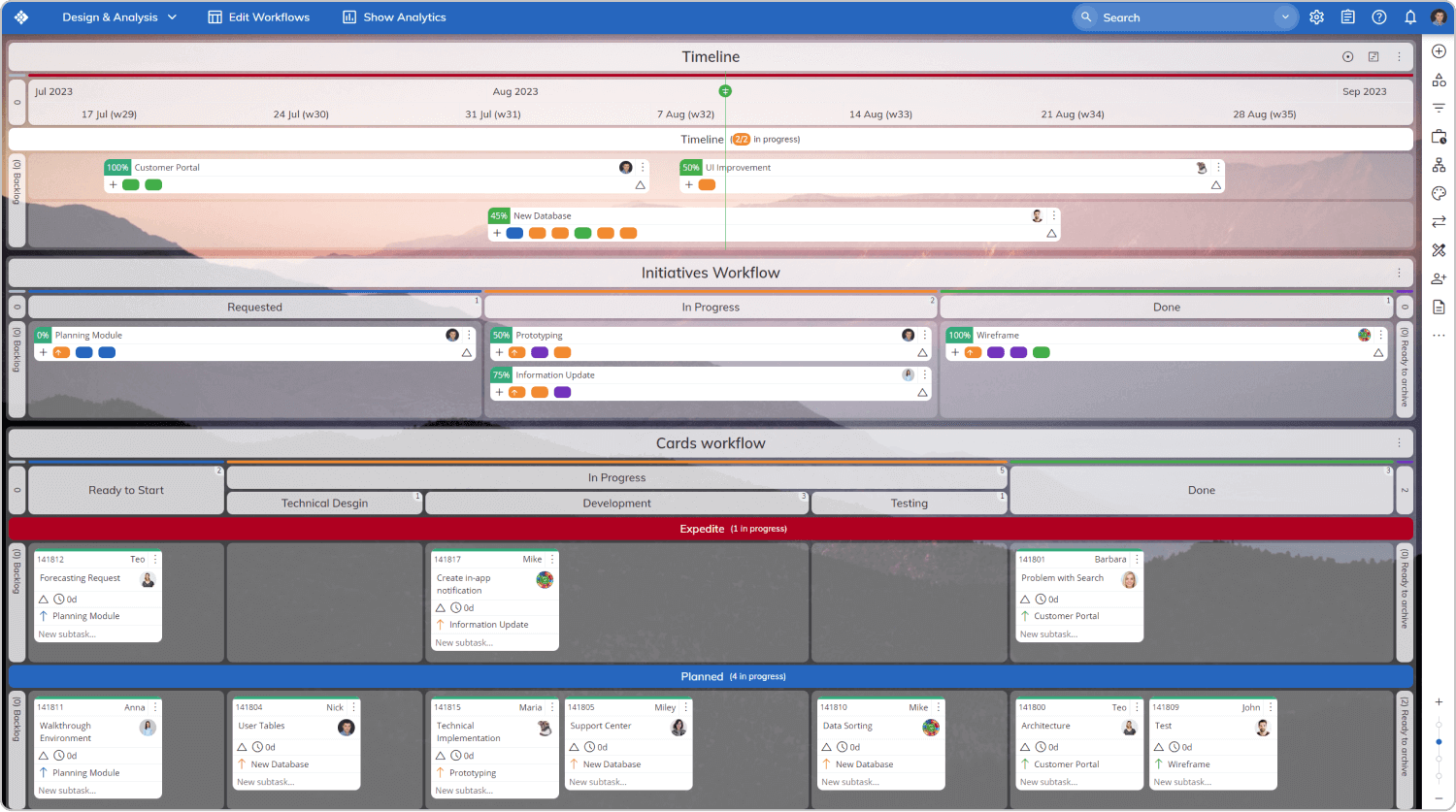 One of the platform's superpowers is its ability to deliver a clear work structure – from visualizing projects or