The best PPM tool for an IT PMO is not the one with the longest feature list, but the one that helps leaders decide whether the organization is investing people, budget, and attention in the right work. For most IT PMOs, that means connecting strategy, demand, capacity, execution, dependencies, risk, and reporting in one reliable operating view.
Key Takeaways
- IT PMOs should prioritize portfolio visibility, demand intake, capacity planning, hybrid work support, dependency management, analytics, integrations, and enterprise security.
- Businessmap is a strong fit for IT PMOs that need Lean portfolio management, strategy execution, flow visibility, and hybrid work coordination.
- The best PPM tool should reflect how work actually moves, not create another layer of manual reporting.
The vendors were selected based on shortlisted vendors in the Gartner Peer Insights' Project and Portfolio Management category, with emphasis on IT PMO relevance. Vendor summaries and review insights were compiled and organized using AI tools, then reviewed against criteria such as visibility, reporting, integrations, implementation fit, security, and workflow support.
What Features Should an IT PMO Prioritize in a PPM Platform?
An IT PMO should prioritize six capabilities.
1. Portfolio Visibility Across All Levels of Work
PMO leaders need to see work across initiatives, programs, projects, teams, and operational streams. In many IT organizations, visibility breaks down because strategy, projects, delivery tasks, and change requests live in different places. A strong PPM platform should connect these levels, from high-level initiatives down to project packages, change requests, and execution activities.
For an IT PMO, this is the difference between chasing status and managing the portfolio.
2. Demand Intake and Prioritization
Without a clear intake process, every request competes through escalation, persuasion, or proximity to leadership. A mature IT PMO needs a visible way to capture, assess, and prioritize demand before it becomes committed work. Requests should enter a structured flow where the PMO can evaluate urgency, strategic fit, capacity impact, dependencies, and expected value.
3. Hybrid Work Support
Most IT PMOs do not live in a pure Agile or pure Waterfall environment. They manage product teams, infrastructure projects, compliance work, service requests, and vendor-dependent initiatives simultaneously. A good PPM platform should make that mixed reality visible.
This is critical for IT PMOs because hybrid work is now the default operating reality.
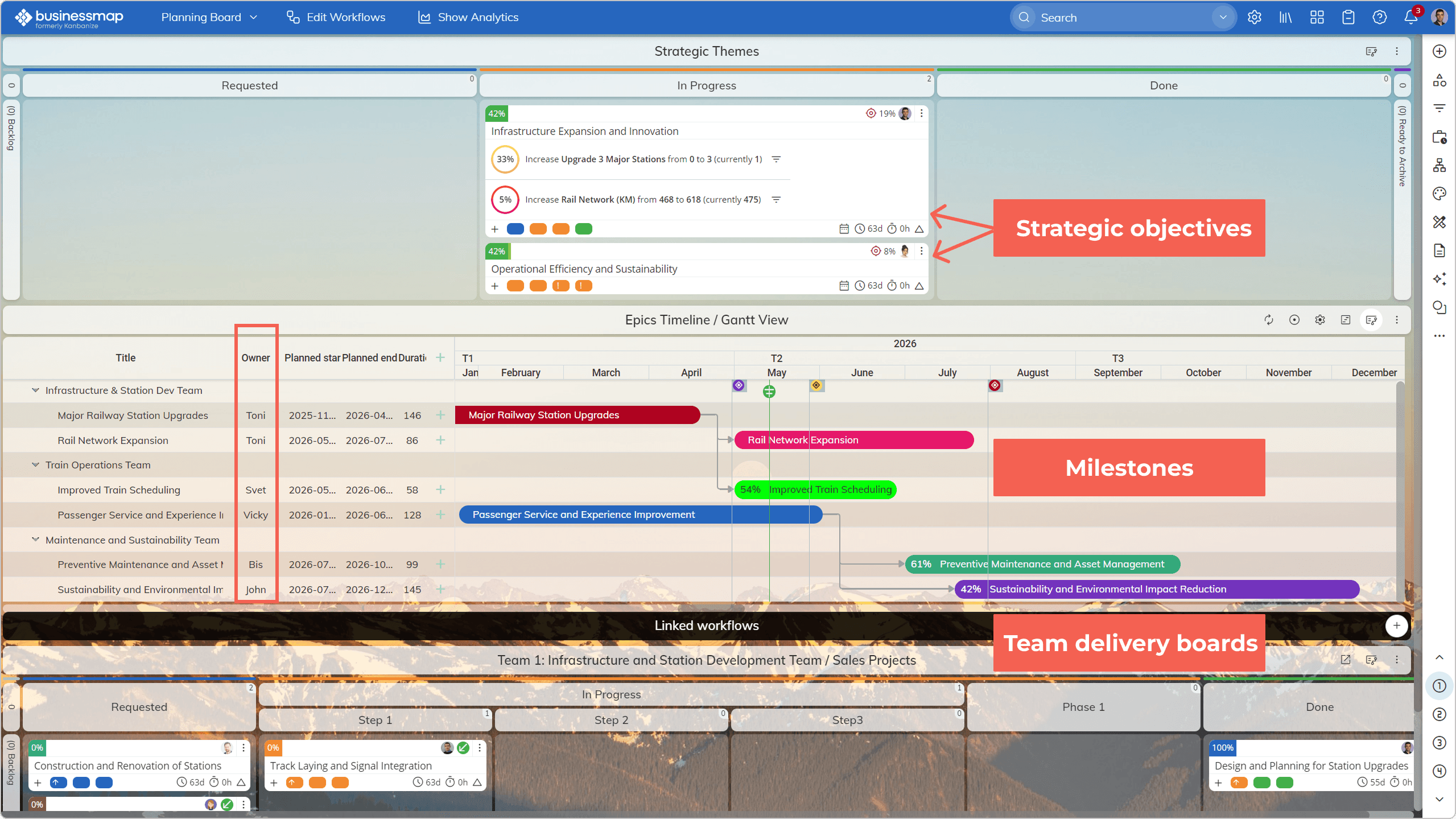 Visualizing strategic intent, planning using timelines, and team-level delivery boards on a single portfolio board in Businessmap
4. Dependency and Blocker Management
In IT, delays often come from waiting, not execution. Common blockers include vendor response, architecture review, security approval, procurement, integration work, and business sign-off. That is exactly what a good PPM should do: turn hidden friction into management insight.
5. Dashboards and Analytics That Improve Decisions
Dashboards should help leaders see what needs attention now. For IT PMOs, useful analytics connect strategic goals with operational work, show how reliably teams deliver, and expose bottlenecks before they become portfolio-level risks. The goal is fewer status opinions and more decision-grade signals.
6. Integrations, SSO, Security, and Support
Enterprise IT PMOs should evaluate integrations, SSO, security, compliance, and support early. They determine whether the PPM tool becomes the system of record or another isolated reporting layer.
At minimum, IT PMOs should review:
- SSO and identity management
- Role-based access
- Audit trails
- Security documentation
- Data residency options
- Vendor onboarding and support
Best PPM Tools for IT PMO: Side-by-Side Comparison
Explore more Cloud PPM Software
Businessmap: Best for Enterprise Portfolio Management and Strategy Execution
Businessmap is an AI-native PPM software designed to help PMOs and transformation leaders align strategy to execution, streamline workflows, and optimize portfolio performance. Businessmap is strongest when the IT PMO needs to connect strategy with delivery without burying teams under heavyweight governance. It helps PMOs manage portfolio workspaces, execution boards, blockers, dependencies, OKRs, and workflow metrics in one operating model.
Key Features
- Native Strategy-to-Execution Alignment: Map strategic objectives, portfolio initiatives and programs, and team-level work items into a single system.
- Enterprise Portfolio & Initiative Management: Multi-project coordination, visualization of initiative hierarchies, and cross-team dependencies.
- Flexible Workflows: Transparent workflow policies, automation rules, and board customization to reflect real operational processes.
- Built-In and AI-Powered Metrics (Without Add-Ons): Built-in analytics, dashboards, and AI insights on performance or any other data without any plugins or additional layers.
- Cloud deployment with enterprise security standards
- Extensive integrations: Jira, ADO, Power BI, Teams, Tableau, GitHub, MCP support, Rest API, and more.
- Superior Customer Support: For enterprise systems where implementation complexity can impact adoption, the level of support significantly reduces risk.
Planview Portfolios: Best for Large Enterprise Portfolio Governance
Planview Portfolios fits large enterprises that need strategic portfolio planning, resource optimization, investment governance, and executive reporting. For IT PMOs, Planview is a strong contender when governance maturity is already high and the organization can support a larger implementation.
The trade-off is learning curve and implementation weight. If the PMO needs fast visual alignment and team adoption, Planview may feel heavier than necessary.
Key Features
- Portfolio and program dashboards
- Investment prioritization and scenario planning
- Resource capacity and demand analysis
- Risk heatmaps and portfolio reporting
- Automated workflows and governance rules
- Integrations with enterprise ERP, ITSM, and DevOps tools
Clarity: Best for Mature Enterprise PMOs
Clarity fits PMOs that need structured governance, resource management, financial planning, and enterprise controls. It works best when the PMO has strong administrative ownership and process discipline.
The trade-off is complexity. Clarity can be powerful, but it requires strong administrative ownership, process discipline, and implementation support.
Key Features
- Strategic Portfolio Management (SPM): Aligns investments with business strategy and priority.
- Financial & Resource Planning: Integrated budgeting, forecasting, and capacity allocation.
- Unified Dashboard & Reporting: Real-time visibility across all investment types.
Celoxis: Best for Practical Mid-Market PPM
Celoxis is a pragmatic PPM option for IT PMOs that need portfolio tracking, resource planning, dashboards, financials, and collaboration without the overhead of the largest enterprise suites.
Its offers cloud and on-premise options, a pay-per-use model, and a 14-day trial.
Celoxis is worth considering when the PMO wants a dedicated PPM platform but does not need the full strategic portfolio machinery of Planview or Clarity.
Very large PMOs may need more advanced strategic planning, governance, or integration capabilities.
Key Features
- Custom Dashboards & Analytics: Fully customizable visuals for executives and PMOs.
- Advanced Scheduling & Gantt Charts: Built-in tools for project timelines and dependencies.
- Risk & Time Tracking: Tools for risk management and tracking work
- Integrations with Dev Tools: Native integration with Jira, Azure DevOps, etc.
Primavera P6: Best for Schedule-Heavy Portfolios
Primavera P6 is relevant when the portfolio is highly schedule-driven, such as construction, infrastructure, or utilities. For IT portfolios centered on software delivery, service work, Agile teams, and strategy execution, Primavera may be too project-controls-heavy.
Key Features
- Unified environment for planning, prioritizing, executing, and monitoring projects and programs.
- End-to-end resource tracking.
- Dashboards, KPIs, configurable reports to evaluate project health.
Microsoft Project/Planner: Best for Microsoft 365-Centric Organizations
Microsoft Project and Planner make sense when the organization already runs on Microsoft 365.
They are familiar options for:
- Project planning
- Scheduling
- Task management
- Teams collaboration
- Microsoft ecosystem reporting
The trade-off is that Microsoft's stack may require configuration, Power BI, Power Platform, or additional governance design to behave like a full IT PPM system.
Key Features
- Gantt Chart & Task Scheduling
- Resource Management
- Cost & Budget Management
- Risk Management
- Cloud & On-Prem Deployment
- Integrations with Teams, Outlook, SharePoint
Explore more MS Project Alternatives
How Do Leading PPM Tools Compare on Reporting, Dashboards, and Analytics?
For large organizations, see our guide to Best Enterprise PMO Software
Do PPM Tools Integrate with Jira or Microsoft 365?
Most leading PPM tools offer some level of Jira or Microsoft 365 integration, but the depth varies. IT PMOs should check whether the integration supports portfolio visibility, not just basic data sync. The goal is to avoid duplicate reporting and make delivery data usable for portfolio decisions.

Nikolay Tsonev
Product Marketing | PMI Agile | SAFe Agilist certified
Nick is a seasoned product marketer and subject matter expert at Businessmap, specializing in OKRs, strategy execution, and Lean management. Passionate about continuous improvement, he has authored numerous resources on modern-day management. As a certified PMI practitioner and SAFe Agilist, Nick frequently shares his insights at Lean/Agile conferences and management forums.