When leadership asks, "Are our most important initiatives actually moving strategy forward?", the answer tells you whether the portfolio is doing its job.
This is where portfolio roadmaps and dashboards become essential. Used together, they give leaders a practical system for strategy execution, not just another reporting layer.
Key Takeaways
- A portfolio roadmap visualizes strategic initiatives, milestones, timelines, dependencies, and expected outcomes across a portfolio.
- A portfolio dashboard tracks the health, progress, risks, flow, and performance of portfolio work.
- Executives use roadmaps to align priorities, sequence investments, and spot conflicts before they become delivery problems.
- Portfolio dashboards support governance by turning status reporting into evidence-based decision-making.
- Businessmap's AI-ready PPM solution helps organizations connect strategy, portfolio initiatives, execution boards, dependencies, and metrics in one system.
What Is a Portfolio Roadmap?
A portfolio roadmap is a high-level visual plan that shows how multiple initiatives, programs, or projects unfold over time.
It helps leaders see the bigger picture: what is planned, when it should happen, who owns it, what depends on what, and how each initiative supports strategic goals.
A useful portfolio roadmap usually includes:
- Strategic initiatives
- Business goals
- Owners
- Start and target dates
- Milestones
- Dependencies
- Status
A portfolio roadmap should not list every task. If it does, executives stop using it. It should show enough detail to support decisions without turning into a delivery board.
What Is a Portfolio Dashboard?
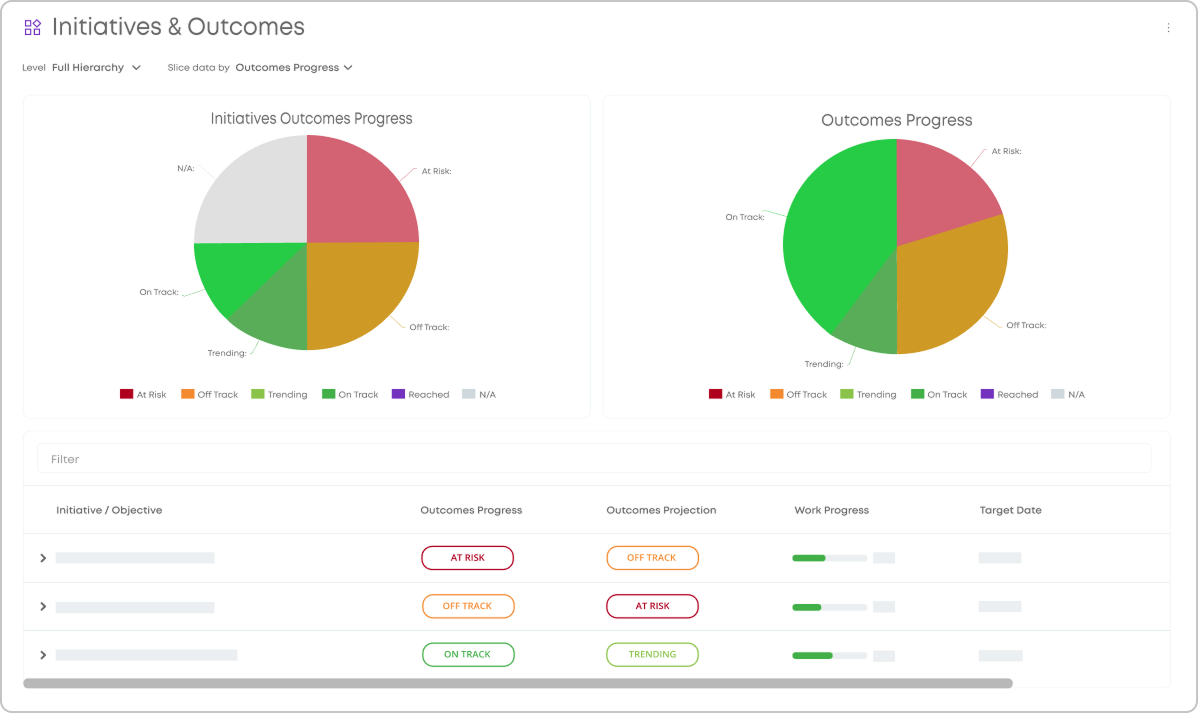
A portfolio dashboard is a centralized view of portfolio health and performance. If the roadmap shows the plan, the dashboard shows reality.
It answers questions such as:
- Which initiatives are on track?
- Which milestones are delayed?
- Where are teams blocked?
- Which programs carry the most risk?
- How much work is in progress?
- Are we delivering faster or slower than expected?
- Which strategic objectives receive the most investment?
A strong dashboard exposes signals that help you act earlier.
For instance, portfolio dashboards in Businessmap indicate both work items' and outcomes' progress at the same time. This way, leaders get an instant overview of whether work is actually driving results.
Learn practical ways to manage outcomes with Businessmap↗
How Are Portfolio Roadmaps and Dashboards Different?
Portfolio roadmaps and dashboards are closely related, but they do different jobs.
A roadmap shows direction. A dashboard shows performance.
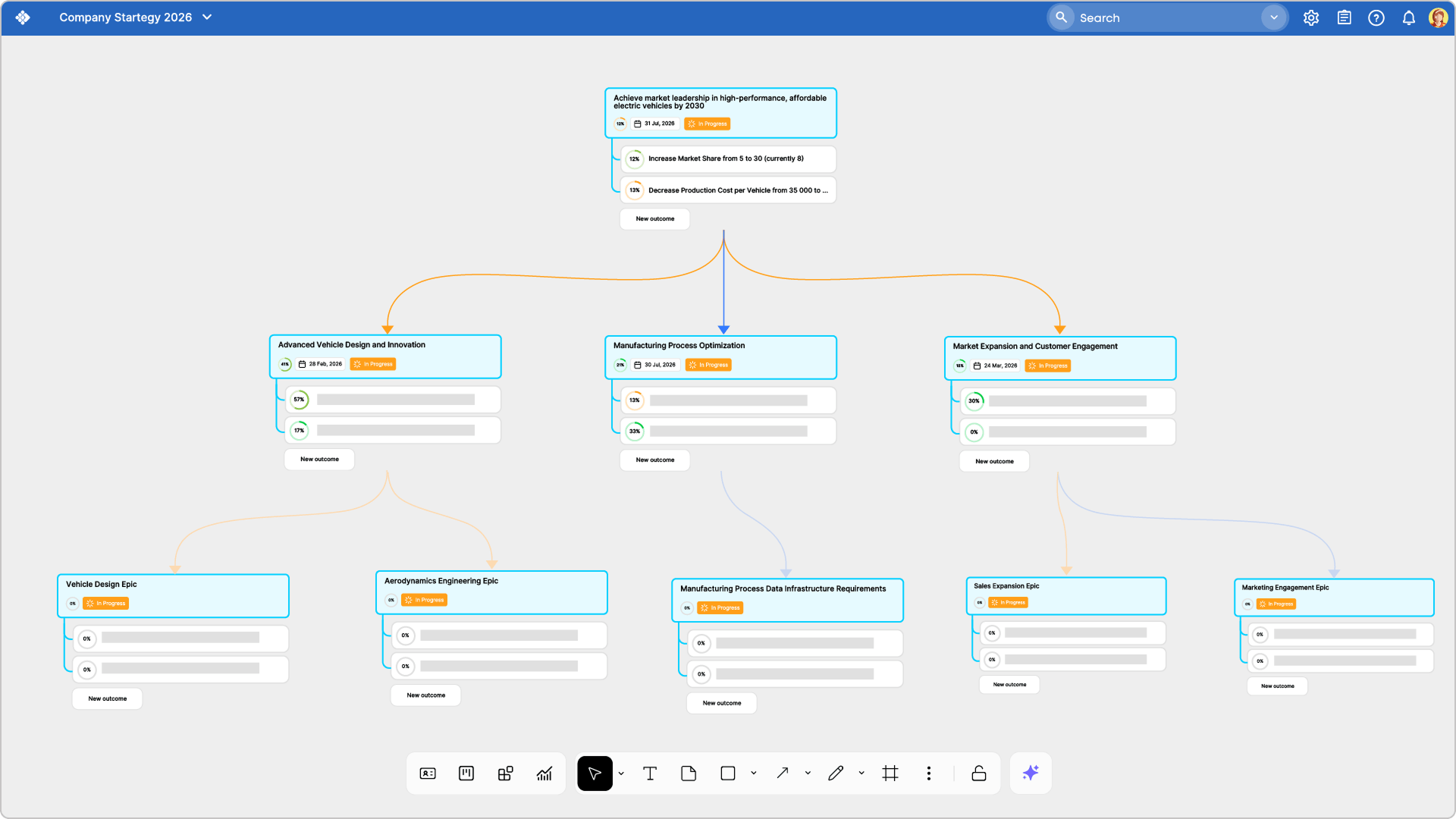
How Do Portfolio Roadmaps Help Executives?
Portfolio roadmaps help executives see how strategic work competes for time, funding, people, and attention. This is where roadmaps become more than visual planning tools. They become decision tools.
A good portfolio roadmap helps executives:
- Align initiatives with strategic objectives
- See overlapping timelines
- Identify overloaded teams or departments
- Spot dependency risks early
- Compare investment areas
- Sequence work more realistically
- Communicate priorities across the organization
- Decide what to delay, stop, or accelerate
How Do Dashboards Support Portfolio Governance?
Portfolio governance is the system leaders use to review, prioritize, fund, adjust, and steer portfolio work. Dashboards support governance based on shared evidence, such as OKRs or KPIs you're tracking.
Leaders can review actual signals:
- Delayed milestones
- Blocked work
- Aging initiatives
- Work in progress
- Flow efficiency
- Lead time
- Cycle time
- Throughput
- Capacity pressure
- Open dependencies
- Risk concentration
What Is the Best Way to Visualize Multiple Initiatives?
The best way to visualize multiple projects or initiatives is to use connected views, not one overloaded chart.
- A timeline roadmap is best for showing initiatives, milestones, and dates across quarters or years.
- A portfolio Kanban view is best for showing flow across stages such as Funnel, Review, Approved, In Progress, At Risk, and Done.
- A dashboard view is best for tracking metrics, risks, and portfolio health.
- A dependency map is best for showing relationships between initiatives, teams, milestones, systems, or vendors.
A good approach is to let leaders move from overview to detail without losing context.
How Do You Build a Portfolio Roadmap in Businessmap?
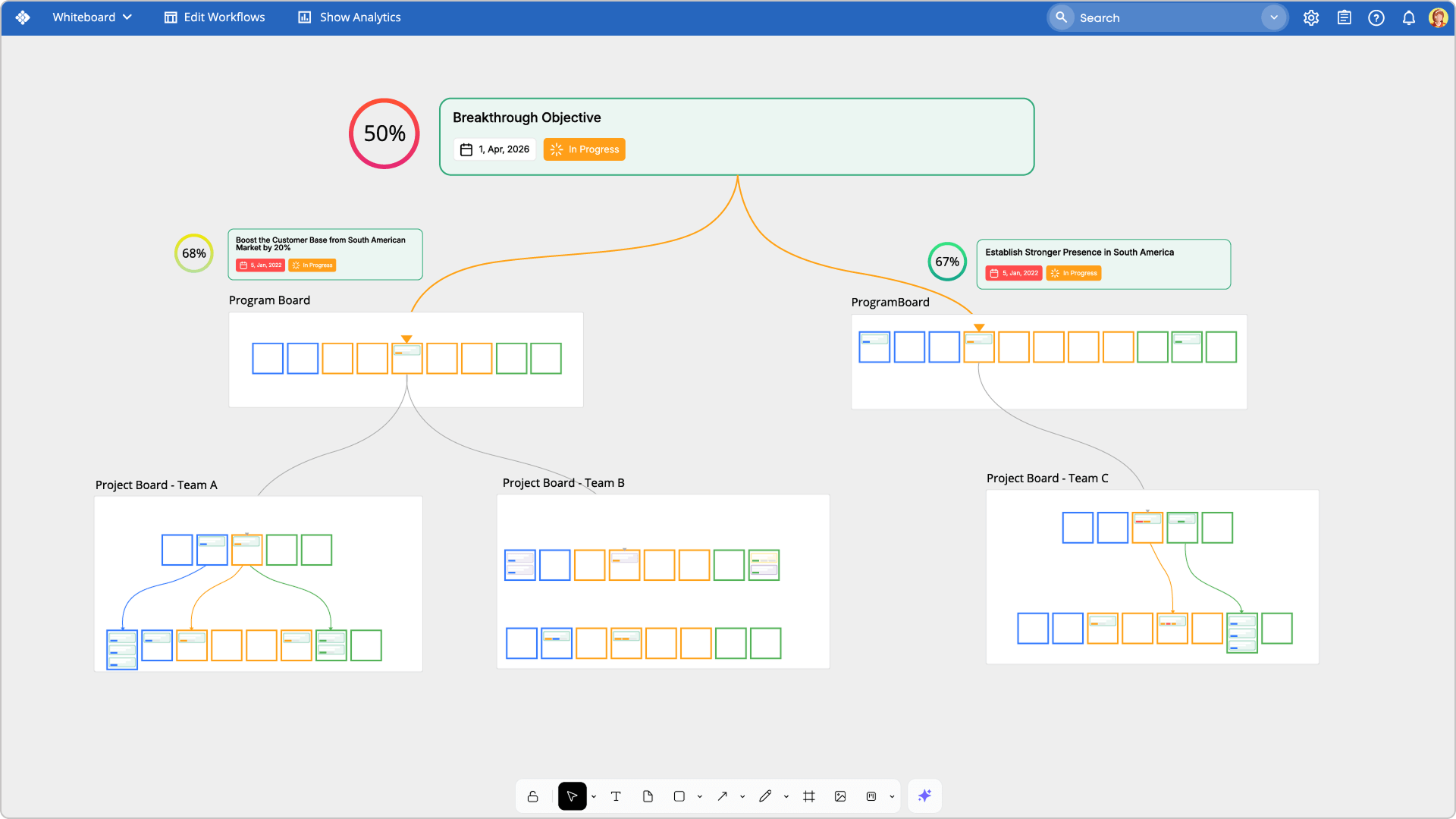
To build a portfolio roadmap in Businessmap, start by defining the structure of your portfolio. Decide what you need to visualize: company-level objectives, portfolios, programs, strategic initiatives, team-level work, or all of them together.
Then create portfolio-level initiatives and connect them with owners, planned dates, milestones, dependencies, outcomes, and execution work.
A practical setup looks like this:
- Define strategic objectives and outcomes.
- Add initiatives that support those objectives.
- Set owners, priorities, planned start dates, and planned end dates.
- Add milestones for key delivery or decision points.
- Map dependencies between initiatives and work items.
- Connect portfolio work to delivery boards.
- Use planning views and Portfolio Workspaces.
- Set Management dashboards to monitor progress, risks, blockers, and outcomes.
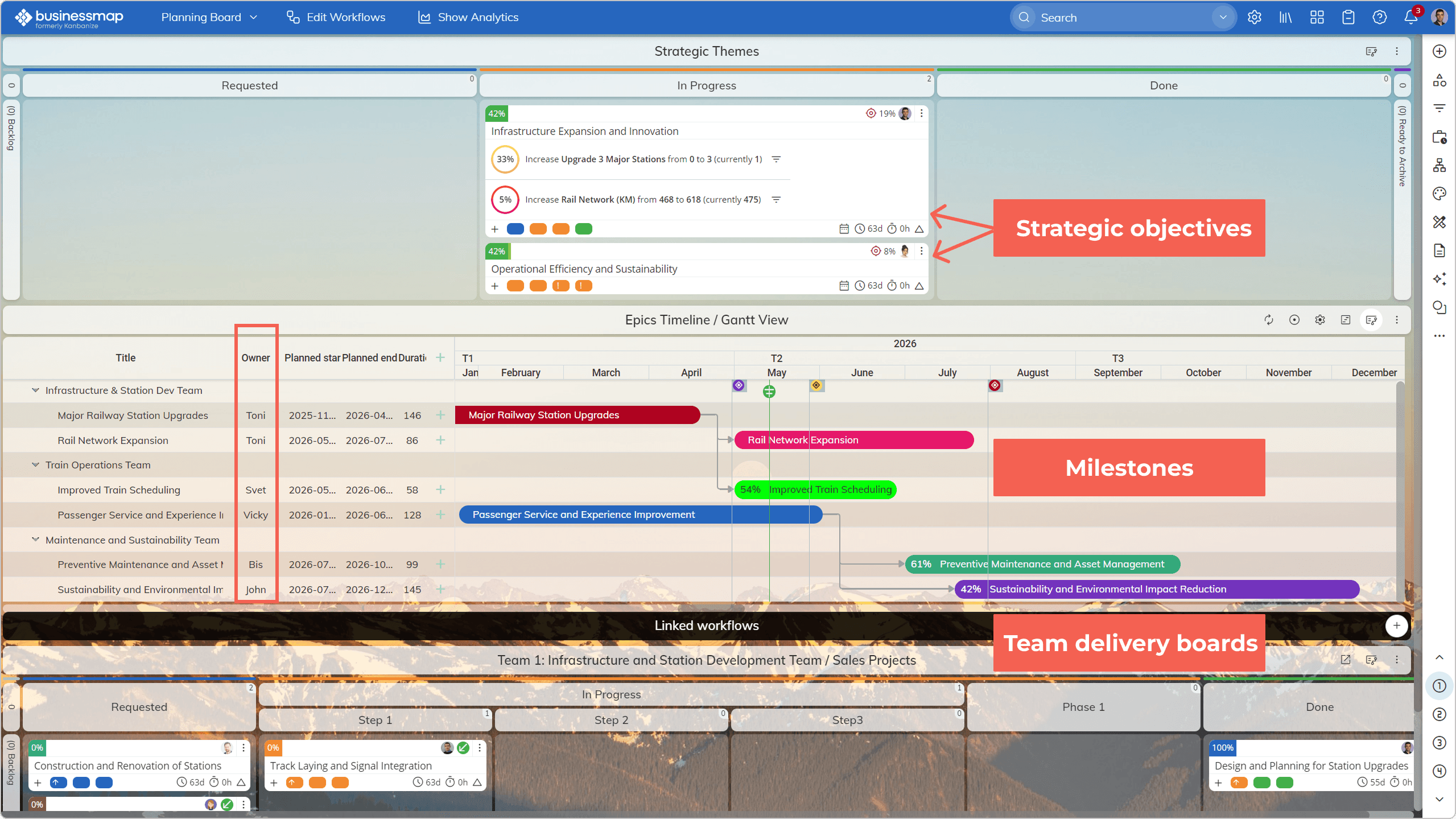
Businessmap's PPM solution helps organizations plan and govern portfolio work in Portfolio Workspaces, execute on delivery boards, and connect plans, projects, outcomes, dependencies, and daily work in one ecosystem. Learn more about Businessmap Management Workspaces↗
What Metrics Should You Add to a Portfolio Dashboard?
A useful portfolio dashboard combines strategic, delivery, capacity, risk, and financial metrics.
The most practical metrics include:
- Strategic alignment metrics: initiatives by objective, investment by strategic theme, work linked to company goals.
- Delivery metrics: lead time, cycle time, throughput, progress, completed work, aging work.
- Flow metrics: work in progress, blocked work, flow efficiency, waiting time.
- Risk metrics: at-risk initiatives, delayed milestones, unresolved blockers, open dependencies.
- Capacity metrics: demand by team, overloaded programs, available capacity, WIP limits.
- Financial metrics: budget consumed, forecasted cost, expected value, cost of delay, benefits realization.
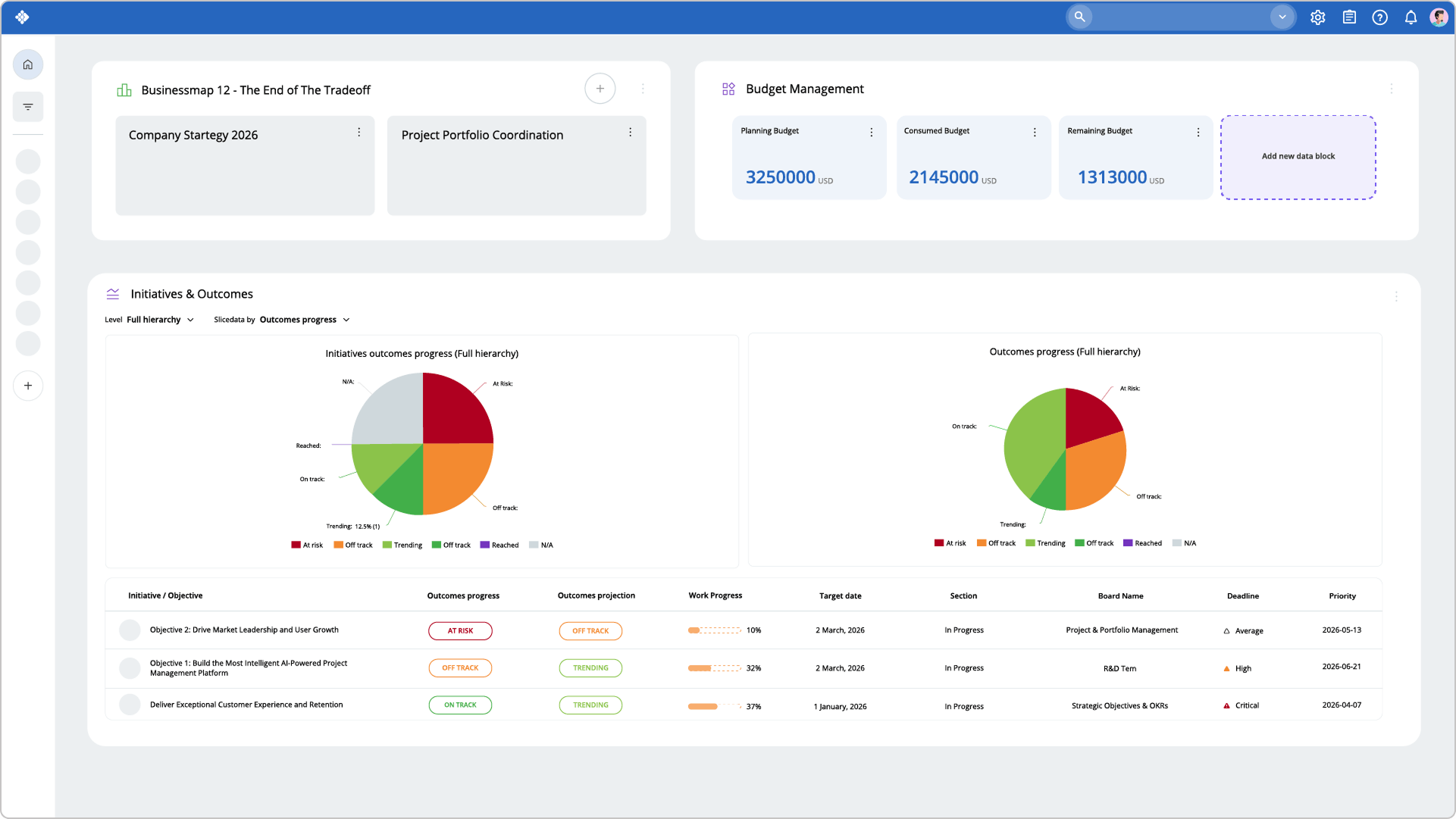 Visualizing strategic initiatives' status and financial metrics on a portfolio management view in Businessmap
How Should Roadmaps and Dashboards Work Together?
Use the roadmap to define direction. Use the dashboard to inspect execution. Use regular cadences to make decisions. Then update the roadmap based on what the dashboard reveals.
Ready to turn portfolio reporting into a clearer strategy execution system?
See how your organization can visualize and manage portfolio work from strategy to delivery.

Nikolay Tsonev
Product Marketing | PMI Agile | SAFe Agilist certified
Nick is a seasoned product marketer and subject matter expert at Businessmap, specializing in OKRs, strategy execution, and Lean management. Passionate about continuous improvement, he has authored numerous resources on modern-day management. As a certified PMI practitioner and SAFe Agilist, Nick frequently shares his insights at Lean/Agile conferences and management forums.