Agile teams often face a practical dilemma: Should we manage work with a Kanban board or a sprint board? While both are Agile tools, they serve different purposes, enforce different behaviors, and scale differently as complexity grows.
Kanban Board vs. Sprint Board: What Each Board Is (and What It Optimizes)?
Both boards visualize work, but they optimize different things. Kanban optimizes flow, while sprint boards optimize timeboxed delivery and commitments.
A Kanban board visualizes how tasks move across clearly defined workflow stages - from request to completion, and work is pulled when capacity is available.
Kanban boards focus on:
- Visualizing all work in progress
- Limiting work in progress (WIP)
- Exposing blockers and delays
- Optimizing flow and predictability over time
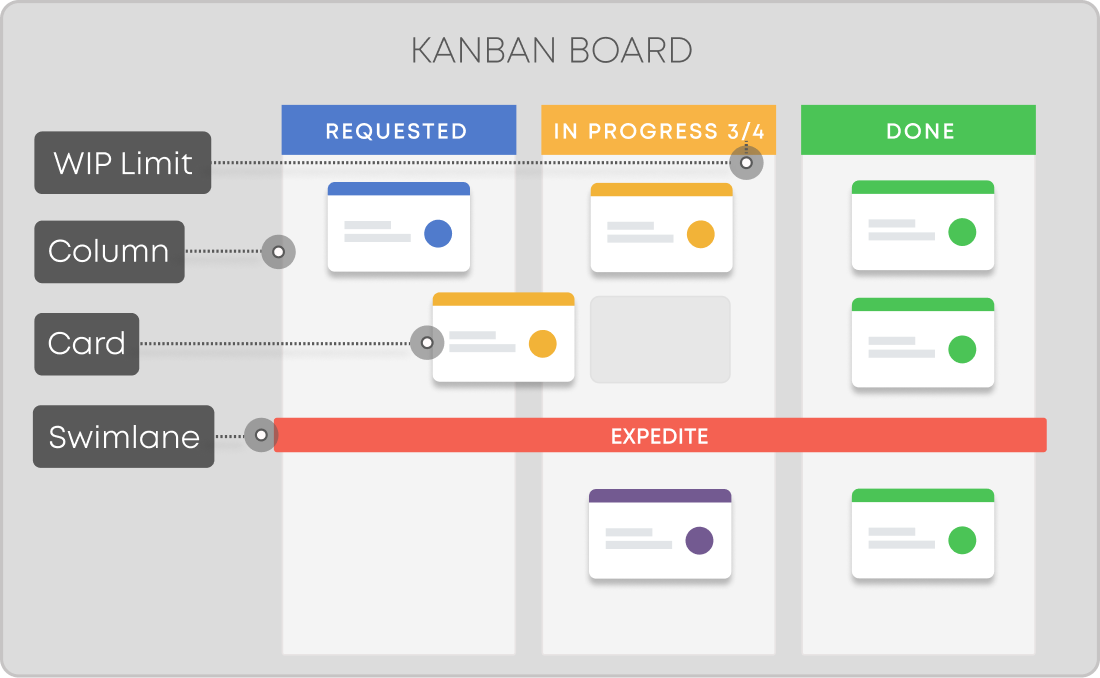 Essential Kanban board components
A sprint board visualizes the work committed to a specific sprint (usually 1-4 weeks) and resets at the end of each iteration.
Sprint boards emphasize:
- Timeboxed planning
- Sprint goals and commitments
- Velocity tracking (story points completed per sprint)
- Regular cadence (planning, review, retrospective)
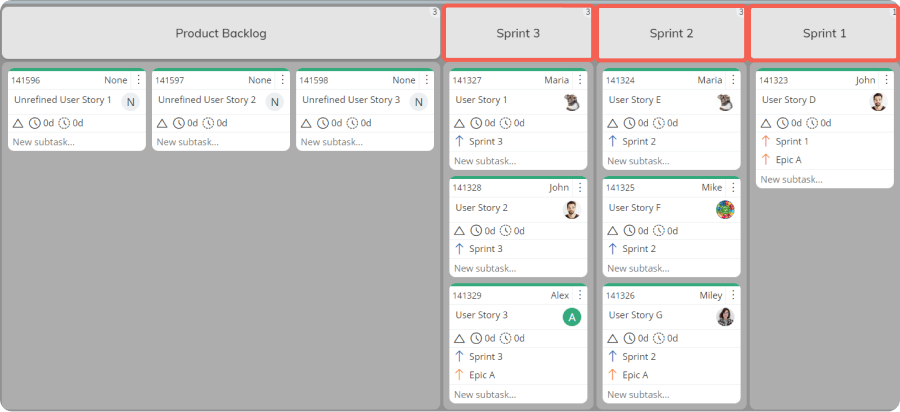 A sprint board visualizing product backlog and three sprints in Businessmap
Kanban Board vs. Sprint Board: What Are the Key Differences?
| Kanban Boards | Sprint Boards | |
| Work model | Continuous flow | Timeboxed iterations (sprints) |
| Planning cadence | On demand, based on available capacity | Fixed sprint planning cycles |
| Primary control mechanism | WIP limits at each workflow stage | Sprint commitment and scope control |
| Visibility | Real-time view of all work in progress, blockers, and aging items | Focused view of work committed to the current sprint |
| Handling change | Highly flexible; priorities can change anytime | Changes discouraged during an active sprint |
| Backlog management | Optional and configurable | Built-in and central to sprint planning |
| Estimation | Optional; relies on historical flow data | Required; uses story points |
| Predictability | Based on cycle time, throughput, and probabilistic forecasting | Based on velocity and sprint completion |
| Reporting focus | Flow metrics (cycle time, WIP aging, throughput, flow efficiency) | Sprint metrics (burndown, velocity, commitment) |
| Dependencies visibility | Explicit, visualized directly on the board | Often hidden or tracked outside the sprint board |
| Subtasks support | Native, continuous, and visible across the workflow | Typically limited to sprint scope |
| Best suited for | Ongoing work, support, operations, mixed-priority environments | Feature development with stable, timeboxed scope |
| Scalability | Scales naturally across teams, projects, and portfolios | Scales well at team level; harder across portfolios |
| Typical adoption curve | Intuitive, incremental, low friction | Requires Scrum discipline and ceremonies |
1. Flow vs. Timeboxing
The fundamental difference is how work is managed over time.
- Kanban uses a continuous flow system. Work enters the system whenever capacity allows.
- Sprint boards rely on fixed iterations. Work is committed upfront and reviewed at sprint boundaries.
Kanban is better suited for environments with frequent interruptions, while sprint boards work well when the scope can remain stable for a short period.
2. Visibility and Work Transparency
- Kanban boards provide stronger real-time visibility.
- They show everything in progress, what’s blocked, and where work is aging.
- Sprint boards focus on the current sprint and have an upstream visualization of incoming demand.
That’s why Kanban complements Scrum by offering a more intuitive, live view of operational reality.
3. WIP Limits vs. Sprint Commitment
- Kanban controls overload through explicit WIP limits at every workflow stage.
- Sprint boards control scope by limiting work to what fits in the sprint backlog.
Kanban prevents multitasking continuously, while sprint boards enforce discipline during planning.
4. Backlog Handling
- In Scrum, the backlog is enabled by default and tightly linked to sprint planning.
- In Kanban, a backlog (or upstream discovery flow) must be intentionally designed and managed.
Businessmap supports both Kanban and Scrum patterns, allowing teams to maintain a Product Backlog while still operating in flow.
5. Estimation and Predictability
- Sprint boards rely on story points and velocity.
- Kanban relies on flow metrics such as cycle time, throughput, and WIP aging.
Kanban forecasting is based on historical delivery data, not estimates, enabling probabilistic forecasting (e.g., Monte Carlo simulations) for sprints, releases, and projects.
6. Reporting Differences
Reporting is often the biggest practical difference between kanban and sprint workflows.
Sprint boards typically focus on:
- Velocity
- Burndown charts
- Sprint completion rates
Kanban boards focus on:
- Cycle time trends
- Throughput stability
- Flow efficiency
- Aging work and blockers
Businessmap supports both styles and allows teams to evolve from velocity-based planning to flow-based forecasting as data matures.
Build Kanban & Scrum boards in Businessmap
Watch DemosWhich Work Board Is Better: Kanban or Sprint Boards?
Use a Kanban Board When:
- Work arrives unpredictably
- Priorities change frequently
- You manage maintenance, support, or operational work
- Visibility and responsiveness matter more than fixed deadlines
Use a Sprint Board When:
- Work can be planned in short, stable increments
- Teams are building toward medium- or long-term goals
- Stakeholders expect regular delivery cycles
- Velocity tracking is still useful
Many organizations use both simultaneously.
Case Study on Focus: Hybrid Agile Delivery in Practice
Devōt selected Businessmap for its flexibility supporting coexisting Kanban and Scrum practices (alongside Extreme Programming), daily standups, planning, and retrospectives. The implementation created unified workflows with WIP limits that prevented overextension and enabled adaptiveness in marketing and faster, higher-quality software delivery in engineering teams.
— Read the complete Devōt case study
Can Kanban Be Customized to Look Like a Sprint Board?
Yes, and in our experience, this is often overlooked.
A Kanban board can:
- Include a Product Backlog
- Visualize sprint commitment points
- Track story points and velocity
- Represent sprint boundaries with timeline workflows
The difference is that Kanban does not require timeboxing. Teams can keep the sprint structure while gaining better flow visibility and predictability.
Businessmap enables this hybrid setup by allowing Scrum processes to run on top of Kanban systems, not in conflict with them.
→ Check out the following tutorial on implementing a Scrum process using Kanban boards in Businessmap.
Which Is Better for Dependency Visibility? Dependency Visibility
Kanban boards naturally support better visibility into work dependencies, making it easier to:
- Break work down incrementally
- Visualize dependencies across tasks, stories, and initiatives
- Track progress without flattening work into sprint-only views
In this regard, Businessmap offers nested boards, multiple workflows, predecessor-successor relationships between work items to create end-to-end visibility across multiple projects.
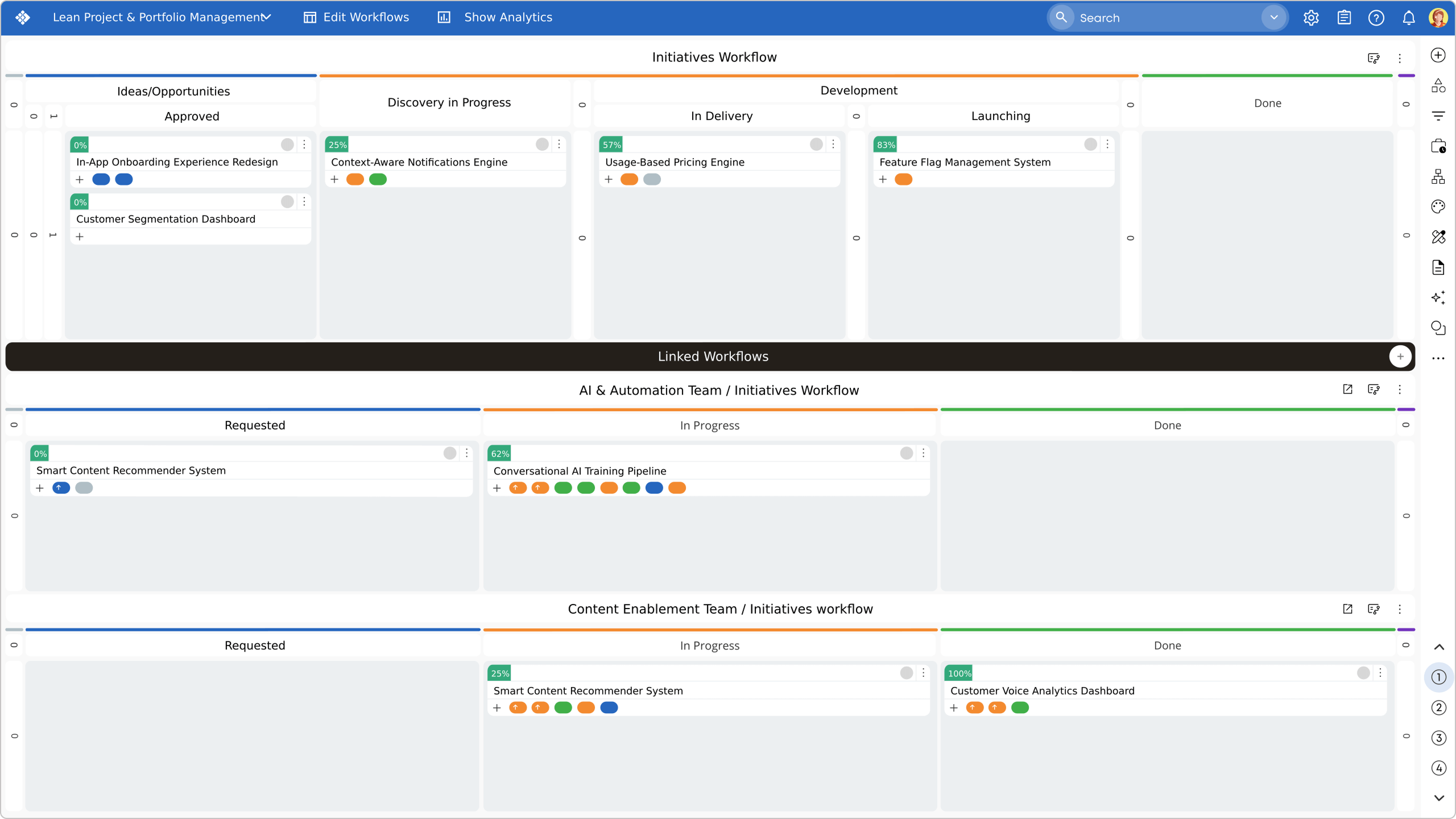 Visualizing portfolio and work coordination boards in Businessmap
Which Scales Better - Scrum or Kanban boards?
Sprint boards scale well at the team level but often struggle across multiple teams, shared dependencies, or cross-project priorities.
Kanban systems scale more naturally because they:
- Visualize dependencies explicitly
- Support multi-level workflows
- Enable portfolio-level flow analytics
Businessmap applies Kanban not just at the team level, but across projects, programs, and portfolios, making it suitable for distributed and enterprise environments.
Case Study on Focus: Scaling Visibility with Connected Kanban Boards
By using Businessmap’s network of Kanban boards, Algar Telecom unified teams around standardized, end-to-end workflows, gaining real-time visibility into project flow, dependencies, and blockers. This shift eliminated hours of manual reporting, improved collaboration across departments, and helped teams remove 20% of critical procedural obstacles in a single month, accelerating delivery through data-driven retrospectives and flow analysis.
— Read the complete Algar Telecom case study
Learn more about the concept of Portfolio Kanban or how to apply Kanban at the portfolio level.
Which Project Management Tools Offer Both Kanban and Sprint Boards?
Many tools claim to do both, but few do it well at scale.
Businessmap stands out by:
- Supporting Scrum, Kanban, and hybrid workflows natively
- Allowing teams to switch or combine boards without data loss
- Providing unified analytics across both approaches
- Scaling from a single team to enterprise portfolios
This is one of the reasons Businessmap is consistently listed on customer-driven shortlists, including Capterra’s 2026 Shortlist for Project Management Tools, and has been successfully used by clients across industries to improve efficiency.
Final Takeaway: It’s Not Kanban or Sprint Boards
Kanban and sprint boards solve different problems.
- Sprint boards help teams commit and deliver in timeboxes.
- Kanban boards help teams see reality, manage flow, and improve predictability.
The most effective Agile organizations don’t choose one dogmatically. They select a platform that supports both, and evolve their process based on real evidence.
Businessmap is designed exactly for that kind of evolution.
Businessmap is the most flexible solution for aligning goals, tracking progress, and gaining full visibility across teams and portfolios — all in one place.

Iva Krasteva
Content Strategist | Agile Practitioner | Kanban Certified
Iva is a Kanban-certified Agile expert with hands-on experience in SEO, content creation, and Lean practices. She has published dozens of articles on Lean, Agile, and Kanban practical applications. Iva actively promotes collaborative, flexible work environments and regularly shares process optimization insights through writing.