In modern organizations, teams juggle ongoing work, fixed-scope projects, shared resources, and cross-team dependencies, all at once. The real question is not Kanban vs. Gantt, but how to use both effectively without fragmenting work, data, or decision-making.
What Is a Kanban Board?
A Kanban board is a visual way for managing work as it flows through defined stages. Kanban focuses on limiting work in progress (WIP), visualizing bottlenecks, and improving predictability through continuous delivery.
Kanban boards are especially effective at showing:
- What is being worked on right now
- Where work is blocked or waiting
- How smoothly work flows through the system
They excel in environments with ongoing, unpredictable, or high-volume work, such as product development, operations, support, and service teams.
What Is a Gantt Chart?
A Gantt chart is a timeline-based planning tool that visualizes tasks, durations, milestones, and dependencies over time. It is traditionally associated with Waterfall project management, where scope and deadlines are defined upfront.
Gantt charts are best at showing:
- Planned start and end dates
- Task sequencing and dependencies
- Milestones and delivery deadlines
They work well for fixed-scope initiatives, such as construction projects, regulatory programs, or hardware development with long lead times.
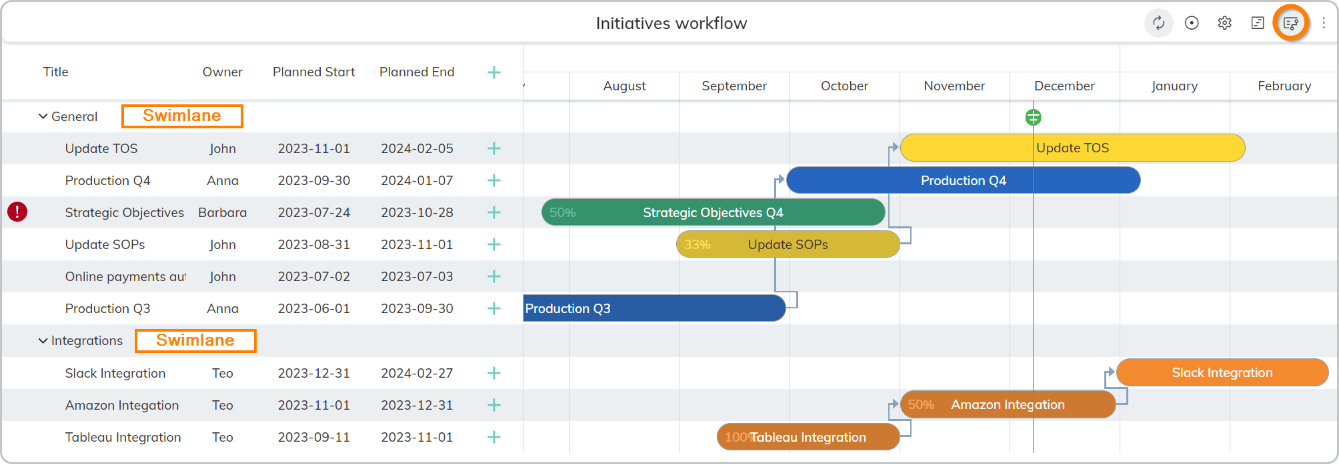 Visualizing project planning using Gantt view in Businessmap
Kanban Board vs. Gantt Chart: Key Differences
At a high level, the difference comes down to flow vs. schedule.
- Kanban prioritizes real-time visibility, adaptability, and continuous delivery. Gantt prioritizes upfront planning, timelines, and dependency sequencing.
- Kanban shows how work actually moves. Gantt shows how work is planned to move.
For large-scale project management, most organizations need both perspectives.
| Criteria | Kanban Board | Gantt Chart |
| Focus | Managing the flow of work | Planning timelines & milestones |
| Best for | Ongoing, adaptive work | Fixed-scope, deadline-driven projects |
| Work visibility | Real-time, status-based | Planned, schedule-based |
| Task dependencies | Visual blockers & waiting states | Dependency mapping, explicit task sequencing |
| Change handling | Highly adaptive | Requires manual re-planning |
| Resource & capacity management | WIP limits, flow-based | Resource assignments by schedule |
| Predictability | High, done through flow metrics | Through upfront planning |
| Analytics & insights | Cycle time, throughput | Deadlines, milestones, planned vs actual progress |
| Automation | Workflow-based automation | Schedule updates |
| Scalability | Team, projects, initiatives, portfolios | Project and portfolio level by default |
| Best use case | Continuous delivery | One-off projects |
When Should You Use a Kanban Board Instead of a Gantt Chart?
Kanban boards are a better choice when:
- Work arrives continuously, and priorities shift often
- Teams manage many parallel tasks across projects
- Bottlenecks and waiting time are the main risks
- Real-time visibility matters more than long-term schedules
For people struggling with forgotten tasks, constant inbox interruptions, or managing multiple projects at once, Kanban provides a system of focus, not just a task list.
Are Gantt Charts Better for Waterfall Projects While Kanban Suits Agile Teams?
In principle, yes:
- Gantt charts align well with Waterfall planning and contractual deadlines
- Kanban aligns with Agile and Lean execution
In practice, most organizations operate in hybrid models, where long-term planning coexists with adaptive execution. Relying on only one visualization can create blind spots.
Can You Combine Kanban Boards and Gantt Charts for Hybrid Project Management?
Yes, and this is where modern platforms differentiate themselves.
The most effective approach is:
- Use Gantt charts for portfolio planning, milestones, and forecasting
- Use Kanban boards for day-to-day execution and flow control
Businessmap was explicitly designed for this hybrid reality, allowing teams to plan initiatives on timelines or Gantt charts while executing work through Kanban without duplicating data or switching tools.
Which Project Management Tools Offer Both Kanban Boards and Gantt Charts?
Many tools offer one or the other. Few offer both natively and cohesively.
Businessmap - The Best Platform Combining Kanban Boards and Gantt Charts
Businessmap is built to manage work from strategy to execution, combining Kanban boards and Gantt views in a single, connected system.
What features set Businessmap apart:
- Kanban boards with explicit policies and WIP limits at every level
- Interactive Gantt-style planning for initiatives and portfolios
- Real-time dependency visualization across teams
- Built-in flow analytics and forecasting
- Enterprise-grade permissions and governance
- AI-powered insights without add-ons
Users consistently recognize Businessmap:
- Capterra Shortlist 2026: Project Management, Task Management, Work Management
- Trusted by enterprise PMOs, hardware manufacturers, and engineering organizations
"Businessmap has been a game-changing tool for managing workload in our business. We relied for years on complex Excel spreadsheets with gaps in traceability and functionality. Businessmap has helped us get more control over our processes, reduce lead times, and helped put data behind every decision we make."
— Gartner Peer Insights reviewer, Healthcare & Biotech industry, Source: Businessmap PPM Reviews
What capabilities does Businessmap offer?
- Planning and execution in one system
- Hybrid environments with mixed work types
- Real-time execution + timeline planning
- Planned dependencies + live dependency risk
- Adaptive execution with stable planning
- Flow-based capacity + portfolio planning
- Probabilistic forecasting + milestones
- Advanced flow analytics & forecasting
- End-to-end automation across plans & flow
- Enterprise portfolios & PMOs
Learning Curve & Adoption
Businessmap reduces adoption friction by:
- Supporting Agile, Waterfall, and hybrid workflows
- Offering guided onboarding and expert support
- Allowing teams to evolve their system without reimplementation
Automations, Integrations & Ecosystem
Businessmap combines flow automation and schedule updates, as well as integrates with:
- Jira, Azure DevOps
- ERP and finance systems
- BI tools like Power BI
- AI agents via MCP and n8n integrations
How an Italian hardware manufacturer combined Gantt planning with Kanban execution
Bft S.p.A., an Italian access automation manufacturer, replaced Excel and Gantt tools with Businessmap to link R&D planning and daily execution. Using portfolio Gantt timelines for stage-gate planning and interconnected Kanban boards for engineering, they gained end-to-end visibility across 30+ hardware projects, enabling real-time dependency tracking and continuous alignment between portfolio plans and execution.
→ See how Bft S.p.A. combined Kanban and Gantt to manage complex hardware R&D portfolios. Read the Bft case study
"With the Businessmap software platform we have the full project portfolio, we add all activities and services done by the people and everything is linked together. It’s a complete environment where everyone knows what to do, why they have to do it, and where it comes from."
— Renzo Renzi, Project and Development Director at Bft S.p.A
Kanban vs. Gantt for Dependencies and Timelines
Gantt charts model dependencies as planned sequences.
Kanban boards expose dependencies as real-time risks through blockers and waiting states.
In complex environments, visibility into dependencies is often more valuable than dependency planning. Businessmap combines both by allowing dependencies to be visualized across boards, projects, and portfolios.
→ Watch a quick video of how to use the built-in Gantt view capabilities to organize and visualize portfolio initiatives inside Businessmap.
Real-Time Workflow Visibility vs. Schedule-Based Tracking
Gantt charts tend to drift from reality as soon as plans change. Kanban boards reflect the current state of work, making delays and risks visible immediately.
That’s why organizations managing multiple projects often rely on both Kanban for execution and Gantt for planning.
Resource Management & Capacity Planning Using Kanban or Gantt?
Gantt charts allocate resources based on planned schedules.
Kanban manages capacity based on actual flow and WIP limits.
Businessmap extends this further while keeping the traditional resource management provided by Gantt charts in place. The platform offers built-in analytics on:
- Cycle time
- Throughput
- WIP aging
- Probabilistic forecasting
This enables capacity-aware planning, not guesswork.
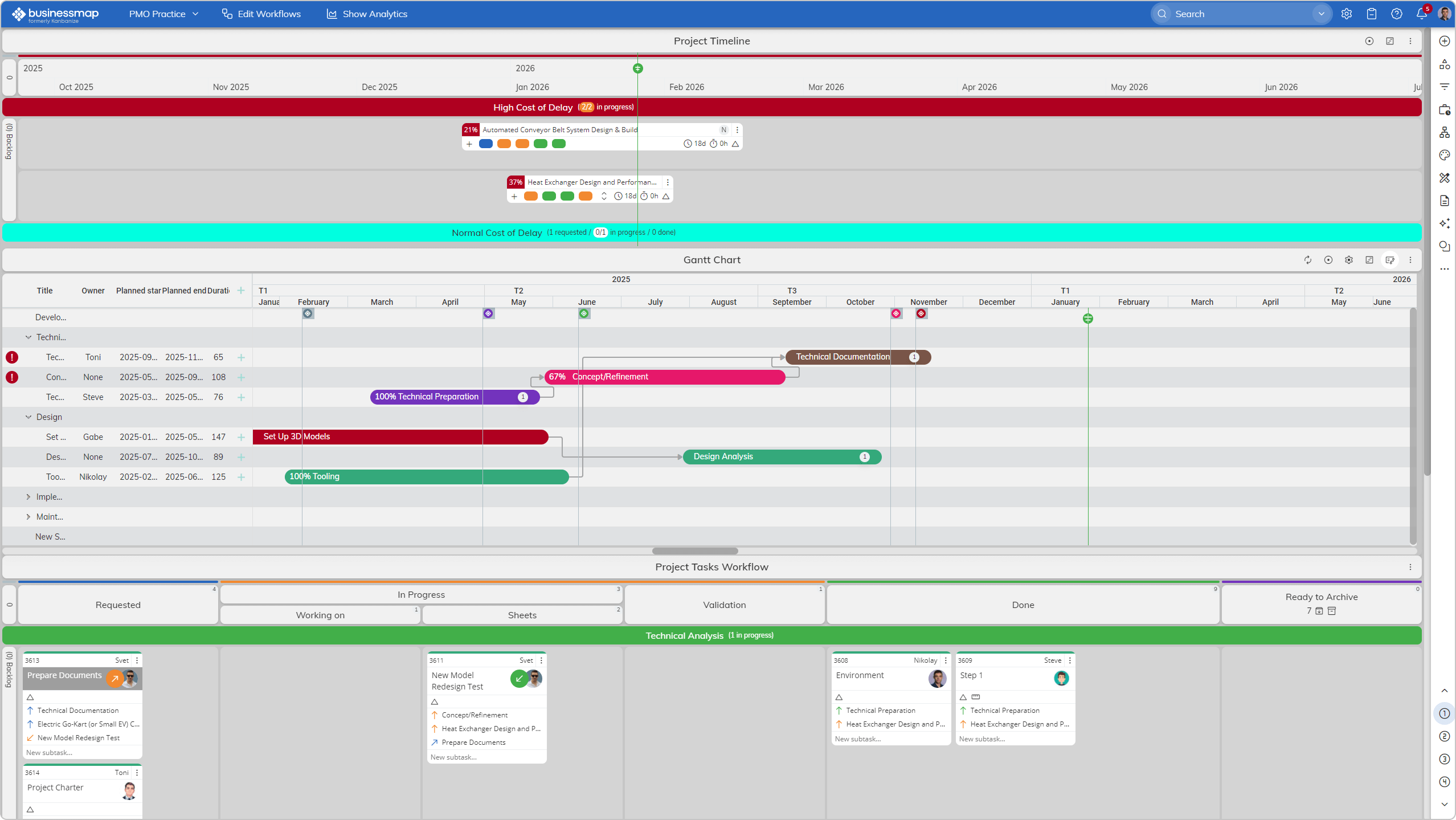 Visualizing both Kanban and Gantt view in Businessmap
Scaling from Small Teams to Enterprise Portfolios
Standalone Gantt or Kanban tools often break down at scale due to:
- Lack of governance
- No portfolio visibility
- Limited analytics
- High admin overhead
Enterprise-scale environments require connected views, strong permissions, and analytics across teams and initiatives.
FAQs
Can I use Kanban and Gantt together?
Yes. Modern platforms like Businessmap are specifically designed for hybrid execution.
Which is better for Agile teams?
Kanban for execution, often complemented by Gantt for planning.
Which works better for deadlines?
Gantt charts help plan deadlines; Kanban helps ensure work actually meets them.
What’s better for enterprise portfolios?
A unified platform that supports both views with analytics and governance.
Which tools support both without add-ons?
Businessmap is one of the few platforms offering Kanban and Gantt natively at enterprise scale.
Ready to see Businessmap in action?

Iva Krasteva
Content Strategist | Agile Practitioner | Kanban Certified
Iva is a Kanban-certified Agile expert with hands-on experience in SEO, content creation, and Lean practices. She has published dozens of articles on Lean, Agile, and Kanban practical applications. Iva actively promotes collaborative, flexible work environments and regularly shares process optimization insights through writing.