One of the most common pain points we hear sounds like this:
"I am spending most of my time with status updates. My work is to disturb people's workflow, get an update, and key it into our Excel sheets. It's a huge waste of time." | Key Manager at a Global Hardware Product Development Manufacturer (Businessmap Case Study)
"Our greatest need was to create predictability and clarity in work,..." | Régis Borges Amorim, Director of Digital Experience and Head of Agile at CTT (CTT Case Study with Businessmap)
These aren't discipline problems. These are system problems.
When managing multiple projects, we find that teams typically struggle with:
- Fragmented work across email, chat, documents, and tools
- Constant context switching, which increases cognitive load
- No single view of everything that matters right now
- Follow-ups falling through the cracks
- Inbox-driven prioritization instead of planned execution
The result? People stay busy, but progress across projects remains unpredictable.
Run projects. See portfolios. Deliver results. All in a single place.
What Multi-Project Management Software Should Help You Do
Effective multi-project management software is one that brings clarity to competing priorities rather than supporting micromanagement.
1. Centralize All Projects in One Place
You need a single source of truth where every project, task, dependency, and follow-up lives in context. Without this, work remains scattered, and important details get lost.
2. Prioritize and Plan Across Projects
Multi-project software must help teams see what matters most across all projects, not just within one initiative.
3. Set Clear Expectations and Ownership
Across multiple projects, unclear ownership is one of the fastest ways to create delays and frustration.
4. Create and Maintain a Realistic Schedule
Multi-project environments require effective planning that accounts for overlaps, dependencies, and shifting timelines without constant rework.
5. Allocate Shared Resources Effectively
People rarely work on just one project. Software must make resource overload visible early, before deadlines slip.
6. Track Progress and Adjust Continuously
Plans will change. The system should support adaptation by making progress, blockers, and risks visible in real time.
7. Communicate Without Status-Meeting Overhead
The goal isn't more meetings but shared visibility. When everyone sees the same data, alignment improves naturally.
 Visualizing an IT department's multiple projects on a unified kanban board in Businessmap
What Makes a Great Multiple-Project Management Tool
Based on real-world execution needs, the best solutions for multi-project tracking environments share a few critical capabilities:
-
Unified portfolio views across all projects
-
Visual dependency management across teams and initiatives
-
Gantt-like planning and Kanban work management transparency
- Cross-project prioritization
- Resource and capacity visibility
-
Automation for follow-ups and recurring work
-
Enterprise integrations (ERP, CRM, time tracking, BI)
-
Scalability from a handful of projects to full portfolios
Top 8 Software for Managing Multiple Projects in 2026
Businessmap
Businessmap is built specifically for environments where many projects run in parallel, resources are shared, and priorities constantly change. Unlike task-centric tools, it treats multi-project management as a portfolio-level problem.
Businessmap is a Capterra Shortlist 2026 top-rated platform for Project, Task, and Work Management, recognized for usability, scalability, and multi-project visibility.
→ Check Businessmap on Capterra
Why Businessmap excels at multi-project management:
-
All projects in one connected system: Projects, initiatives, and goals are visualized together.
-
Multiple views, one source of truth: Kanban boards, timelines, and Gantt-based planning coexist seamlessly.
-
Dependency management across projects: Teams can see how work in one project impacts others before delays occur.
-
Portfolio-level prioritization: Leaders can rebalance priorities across projects based on real capacity and progress.
-
Resource visibility: Shared resources and overload become visible early, enabling proactive planning.
-
Real-time dashboards: Progress, risks, and bottlenecks are visible without chasing updates.
-
AI capabilities for breaking down work, generating ideas based on your business context, analyzing work performance, and more.
Where many tools help you manage projects, Businessmap helps you manage multiple projects as a system, which is the difference between staying busy and delivering predictably.
→ Best for: Organizations managing multiple priorities across teams, departments, or portfolios.
Connecting projects with their actual execution across teams using the Linked Workflows feature in Businessmap
Businessmap is the most flexible software
to gain full work visibility across teams & portfolios
Celoxis
Celoxis is an enterprise project and portfolio management platform, designed for organizations managing multiple projects and portfolios. It helps teams plan, execute, and govern work across projects using resource planning, portfolio dashboards, Gantt charts, and workflow automation.
Strengths:
- Portfolio dashboards with real-time project visibility
- Resource planning, workload balancing, and capacity management
- Gantt charts, project dependencies, and workflow automation
- Budgeting, time tracking, and financial management
- Custom dashboards and enterprise reporting capabilities
Limitations:
- Some advanced capabilities are available in higher-tier plans
- Initial configuration may require planning for larger organizations
- Feature depth may exceed the needs of smaller team
Asana
Asana is a popular task and work management tool, often used for coordinating work across teams. It offers teams to organize work across projects, portfolios, and workflows, through lists, calendars, and Kanban board views.
Strengths:
- Clean UI and strong task management
- Good collaboration and automation for team-level work
- Project, List, Boards, Calendar, Timeline, Gantt, Goals, Portfolio Views
- Asana AI for smart workflows (paid plans only)
- AI Studio (available with credit limitations depending on tier; additional credits available for purchase)
Limitations:
- Portfolio views, capacity planning, and advanced reporting require higher-tier plans
- Timesheets and budgets, permissions, and compliance management available as add-ons
- Scaling predictably across dozens of projects can become costly and complex
→ Read more about Asana alternatives
→ Find more European alternatives to Asana
Meisterplan
Meisterplan is a European project management tool focused on long-term resource planning and scenario-based decision-making. Teams and organizations use the software to ensure that initiatives contribute to strategic priorities and resolve resource bottlenecks across multiple projects.
Strengths:
- Visual portfolio views
- What-if scenario planning
- Goals management and alignment
- Portfolio-level Kanban boards
Limitations:
- Learning curve
- Only Premium tier users can choose between the available hosting locations
ProjectManager
ProjectManager focuses on traditional project planning and execution, with strong scheduling capabilities. It offers planning, tracking, and reporting in one place.
Strengths:
- Robust Gantt-based multi-project planning
- Clear scheduling and reporting features
- Workflow automation
- Real-time dashboards
- Timesheets & task lists
- Custom reports
- Task lists
Limitations:
- Limited portfolio-level governance compared to enterprise platforms
Smartsheet
Smartsheet combines spreadsheet familiarity with project management capabilities. Users can create, assign, and monitor tasks with due dates while tracking progress across multiple projects and diverse workflows, ensuring full organizational transparency.
Strengths:
- Familiar grid-based interface, calendar, and Gantt views
- Strong reporting and structured planning
- Automation workflows
- Resource management
- Customizable dashboards
Limitations:
- Managing many projects requires careful configuration
- Dependencies and cross-project visibility can become complex to maintain
Wrike
Wrike offers advanced project tracking and automation, customizable workflows, advanced analytics, and strong collaboration tools.
Strengths:
- Kanban boards for task visualization
- Gantt charts with drag-and-drop scheduling
- Workload view for resource management
- Powerful automation and reporting
Limitations:
- Requires configuration and admin effort at scale
- Portfolio-level clarity can depend on setup and plan level
Microsoft Project
Microsoft Project remains a powerful tool for traditional project scheduling and resource planning. It offers a Gantt chart view, which provides detailed timelines and dependencies.
Strengths:
- Advanced Gantt charts and scheduling
- Strong resource management capabilities
- Project roadmaps
- Pre-built reports
- Time tracking
- Custom dashboards
Limitations:
- Less intuitive for collaborative, cross-functional work
- Heavier learning curve for non-PMO users
Integrations That Matter for Multi-Project Management
Managing multiple projects rarely happens in isolation. Leading multi-project management tools integrate with:
- ERP and finance systems for cost and capacity visibility
- CRM tools to align delivery with customer commitments
- Time tracking tools for effort and utilization insights
- BI platforms for portfolio-level reporting
Businessmap goes far beyond basic app connectors by offering a future-ready integration architecture designed for complex, multi-project environments. With native MCP (Model Context Protocol) support, it offers structured integration with AI tools such as Claude Desktop, Claude Code CLI, Cursor, and other AI agents.
In addition, Businessmap provides a robust REST API, flexible webhooks, and no-code automation rules that allow teams to connect Businessmap with tools like Microsoft Teams, Azure Repos, Power BI, and QlikView without developer effort.
How to Choose the Right Multi-Project Management Software
Before choosing a tool, ask:
- How many projects are running at the same time?
- Are resources shared across projects?
- Do we need Gantt, or Timelines for project planning, or both?
- Are dependencies between projects critical?
- Do leaders need a real-time portfolio view, not just task updates?
FAQs
Which PM software is best to manage multiple priorities at once?
Platforms designed for portfolio visibility and prioritization, like Businessmap and Celoxis, can handle competing priorities better than task-only tools.
What is the best platform for visualizing multiple projects in one view?
Tools that offer portfolio dashboards and unified timelines provide the clearest cross-project visibility.
Which tools support Gantt-based multi-project planning?
Businessmap, Celoxis, ProjectManager, Meisterplan, Smartsheet, and Microsoft Project all support Gantt-style planning across projects.
Can one tool replace multiple to-do lists and project trackers?
Yes, multi-project platforms centralize tasks, follow-ups, and priorities into a single system of record.
Which multi-project management tools scale best for teams and enterprises?
Businessmap's solution is built for portfolio management and governance, rather than individual task tracking, and scales more predictably as project volume grows.
Businessmap is the most flexible software
to gain full work visibility across teams & portfolios



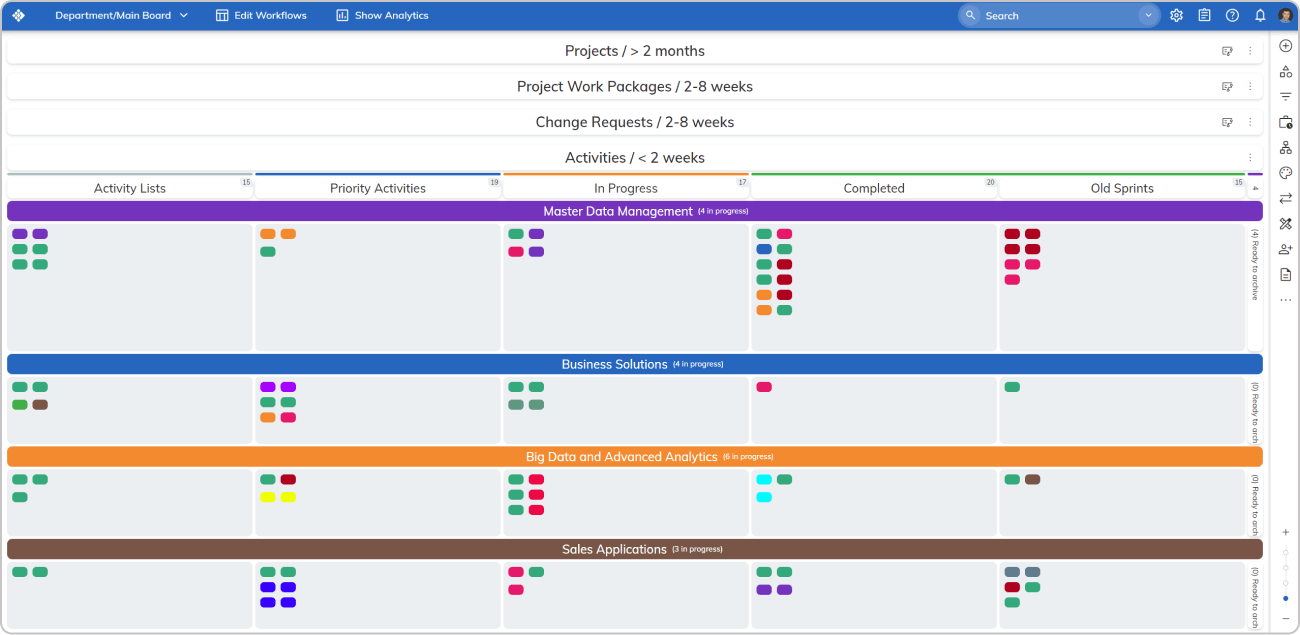 Visualizing an IT department's multiple projects on a unified kanban board in Businessmap
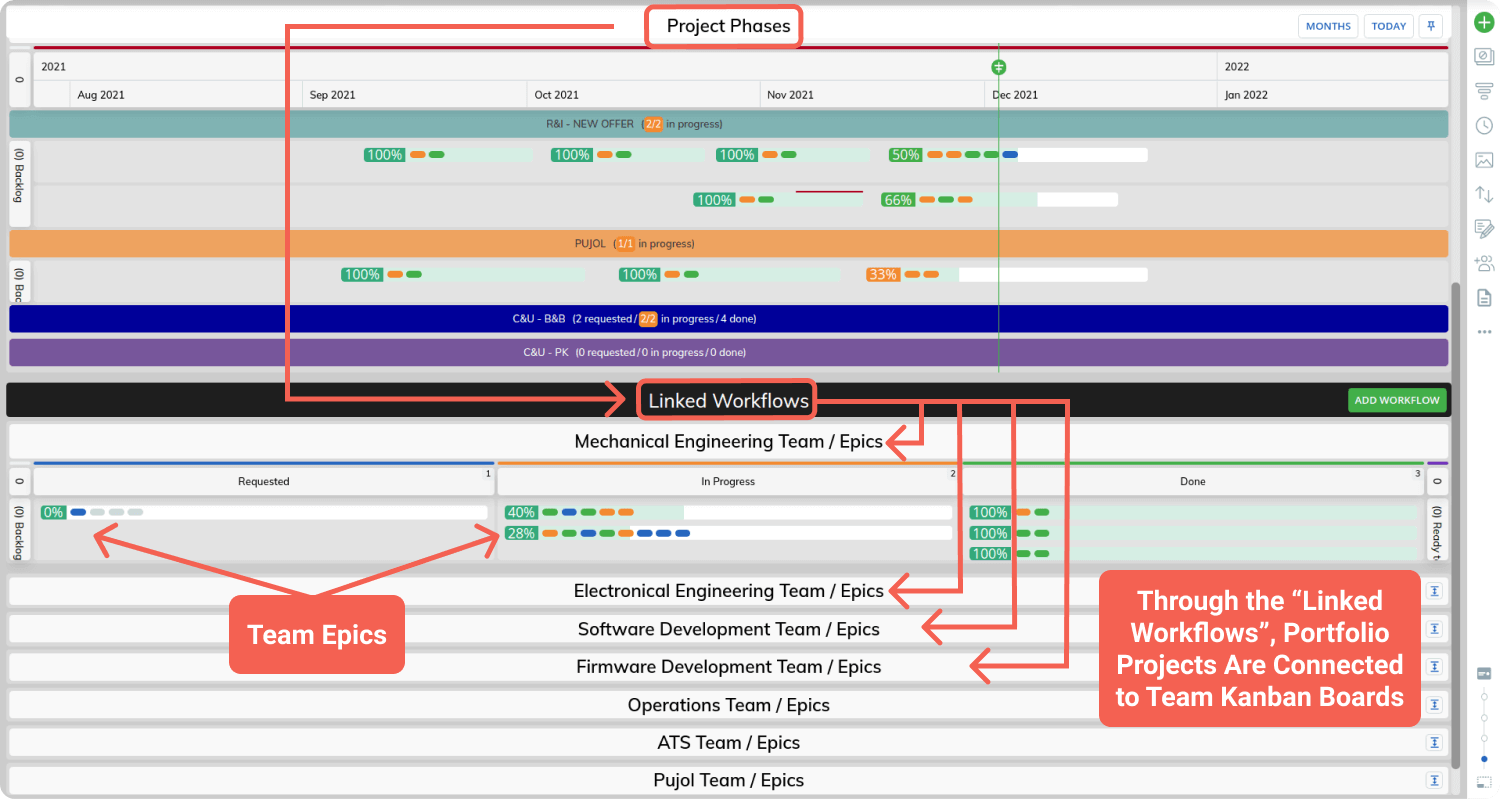 Connecting projects with their actual execution across teams using the Linked Workflows feature in Businessmap